Picture

Picture
Showing posts with label Legacy. Show all posts

Friday, June 7, 2013

My Legacy Family Tree 8 Wish List

Legacy SoftwareI’ve been hearing rumors that a new version of Legacy Family Tree will be released later this year.  In fact, Geoff Rasmussen will be discussing it at SCGS Jamboree later today in a demo called “What’s New in Legacy Family Tree 8.”  (Boy, I wish that session was being streamed live!!).  While I have no details, I do look forward to the Legacy 8 release.  In the meantime, I thought I share a few of my “wish list” items. 

First, Legacy has been due for an upgrade for awhile now.  Compared to many of the other popular programs, such as Roots Magic and Family Tree Maker, Legacy’s user interface looks a little dated.  Personally, I could care less.  As long as it does what I need it to do and it’s laid out in a manner that jives with my workflow,  I don’t really care about aesthetics.  There are a few things I’d like to remain the same, but there are also some things I’d like to see changed improve functionality.  Here’s my wish list:

Keep Some Things the Same!

Although I imagine there will be some cosmetic changes to the UI, I hope that they maintain the integrity of the program.  For example, I hope they don’t change anything structurally in the Family view (pictured below). 
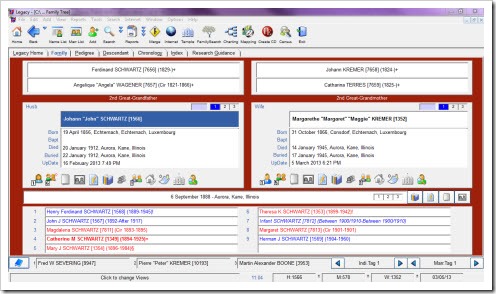
Legacy Family View

Out of the other programs I have tried, Legacy’s family view is the best, in my opinion.  It’s like having a family group sheet on your screen, and I certainly appreciate that visual.  I also like that fact that you can customize what data is displayed for the focus couple, as well as how the children are displayed (I prefer the two-column view).  This is also the only program (of those I’ve tried) that displays the family in a top-down manner.  The focus couple is in the middle, their parents above, and children below.  Other programs seem to be going with the side-view, similar to a pedigree chart, and I have a hard time with that.

Another thing I don’t want to see changed is the data entry screen for an individual (pictured) below.  I like that the vital stats are called out at the top, while all other events are displayed below.  I also like the fact that you can change the sort order of the events to sort by date or name.

Legacy Individual

Data Entry of Location

I really want to see the location field split into two fields that I can see. In other words, I’d like to see a field for the “place” and the “location” and see both fields. 

For example, I want to be able to have a “place” field in the burial information so I can enter the name of the cemetery, independent of the “location” (i.e., city, county, state).  This way, my master locations remain manageable and I have consistency with the name of the cemetery. 

I would also like this “place” field to function just as the master locations, where you can add notes to the master “place” such as address, directions, GPS coordinates, and/or notes such as previous or other names of the location, and once it’s set up, it can be reused as a master.

Yes, I realize that there are some options currently available (see image below), but it’s a buried (no pun intended) feature and I cannot tell by looking at the screen in what cemetery this person is buried in unless I make it a master location.  I would like the notes to stay, as this is where I enter the plot information.

Legacy Location

The same can be said for the other vital events, such as place of birth and death (e.g., name of hospital) and baptism (e.g., name of church).  I’d also like to see this option for all event types solely to maintain consistency.  Sure, I can enter an event for a funeral, and put the church name in the description field, but because it’s not a master, that church name could be altered each time I enter it whether it be for a funeral, baptism, confirmation, or other church event.  And again, any information added to the “place” field, such as address, would be carried along.  A change of this type would require a lot of cleanup, but I’m okay with that.

Sources

First and foremost, I want to be able to source each piece of an event.  For example, if the source I have only gives me a date of birth, but not the location, I want to attach the source to the date piece only, not the entire birth event.

The other thing I’d like to see with regard to sources is the ability to customize the available templates and create new templates.  One of my pet peeves is the way some source templates operate. 

For example, the US census templates want you to specify the state and county in the master source.  However, when you are dealing with a ton of places over many years, that list will grow astronomically!  So, I choose to have one master source for each year, and then put the city, county, and state in the city field of the source detail.  It of course renders my source citation a little differently, but at least it’s consistent and I don’t have an insane amount of sources, by place, for each census.  If I were able to customize the source template, I could probably fix that problem.  I could also create custom templates for sources where no template exists, which I could then reuse to maintain consistency.

Either of these changes would require a lot of data cleaning.  However, most of us are still cleaning up from the old source system to the SourceWriter system, so, hey, why not.  Unfortunately, that’s just they way it works with software sometimes.

Events Attached to Multiple People

Wouldn’t it be great if you could just enter an event for one person and then add other people and their “role” to that “master” event?  (Yes, there is a program out there that does this very thing.)  It would certainly be great for censuses; add the event to the head of household and attach everyone else to the event (instead of copying/pasting the event for each person).  Then, if you make a change to the event, say you made a typo or found new information, it would update it for everyone attached. 

This would also be great for events such as weddings or funerals, where you can attached those who attended the event.  It would also work well for records such as deeds, where you could attached the grantee and grantor, as well as any witnesses (certainly helps with analysis when using the FAN principle).

Last Words

This isn’t too much to wish for, is it?  Guess we’ll find out soon.  What about you, do you have a Legacy wish list?  Leave a comment and let me know what you’re hoping to see in Legacy 8.


Share/Bookmark

Wednesday, January 2, 2013

Legacy Family Tree Releases Their 2013 Webinar Schedule

webinarlogo

Last week, while I was out of town, Legacy Family Tree announced its lineup of 2013 webinars.  There are plenty of topics to choose from, across all skill levels.  Here are a few that I am really looking forward to attending:

I’ve already signed up for all the webinars I want to attend.  This way, they are on my calendar in advance and I can plan accordingly, especially for those I don’t want to miss!


Share/Bookmark

Tuesday, April 10, 2012

Using the Kindle Fire for Genealogy – Families

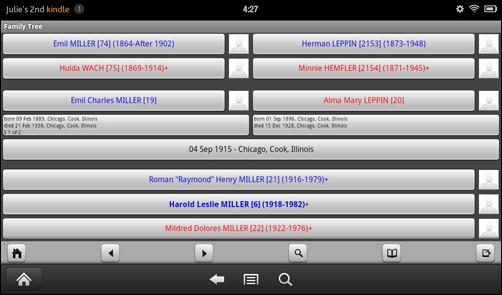
I just LOVE the Families app (Android, iOS; $15).  It’s basically a mobile app for Legacy Family Tree, which is the genealogy software that I use.  The interface is very similar to Legacy so there’s not a big learning curve.  You do need to download Families Sync (free) and install it on your computer in order to transfer the files between your computer and device.

Kindle-families

Because of the Families app, my Kindle Fire is all I need when I’m out and about doing research.  In fact, it was the only thing I had with me during my entire Family History Library trip in February.  My laptop stayed in the hotel room all week and I didn’t miss it at all.  And as I was lugging my laptop (power cord, extra battery, security cable, etc.) through two airports on the way home, I made up my mind that the laptop can stay at home on future research trips (I can do all my email on the Fire or my Android phone).

Kindle-families1 While researching on-site, whenever I need to reference something, I just open the Families app and either navigate to the person or do a search for them.  The app contains the same information as entered in Legacy, including tags, to do list items (individual and general), sources, and bookmarks.  You can also have multiple family tree files.  I’m not sure how big a file the app will support, but mine is 10,000+ individuals and it works just fine (and synched in no time).

Do you need another great reason to have the Families app on your Kindle Fire?  How many times have you been with family (or even at a genealogical society meeting) and the topic of your family research comes up?  Plenty I’m sure, and don’t you just hate it when you can remember specific details?  This happened to me a few times with my in-laws.  But a few months ago, while at the in-laws for dinner, they started talking about their family and asked if I knew this, that, or the other, and I was able to reply, “I don’t know, let me get my Kindle Fire out and look at my database.”  True story!!  And boy were they impressed with the information I had collected over several generations.  I pretty much have my Kindle Fire everywhere I go, so I’m armed and dangerous when it comes to questions about my family history.

I like the Families app better than the Ancestry app (will review soon) for a few reasons, one being that Families is easier to navigate and functions very much like Legacy.  In addition, Legacy is my main database and as long as I sync periodically (or right before a research trip) between my computer and my Kindle Fire, I have pretty current data.  Since my Ancestry family tree is not up-to-date, it really does me no good (right now, my Ancestry tree has 6,968, whereas my Legacy database has 10,307…wow, I’ve covered a lot of ground in a year!).

My biggest complaint is that you can’t see multiple marriages.  On the family screen, it does indicate how many marriages, but there is no way to access a list of spouses and the family view only shows the “preferred” spouse.  So if you want to know who the other spouses are, you have to change to the “timeline” view (it defaults to the husband, but you can click on the wife’s name at the top to see the timeline in her perspective).  I hope the app developers make this available from the family view and individual view in a future update.  CORRECTION:  Linda McCauley (Documenting the Details) left a comment explaining that you need to press and hold on the name of the person and that a window will pop up with the option to switch to another spouse.  Thanks, Linda!!

Even though there is a $15 price tag for this app, I think it’s worth it.  It’s so much nicer to throw the Kindle Fire in my purse and take it with me to repositories than to lug my laptop around.  I highly recommend the Families app.

If you want to know more about the app, Legacy is having a webinar on Wednesday, April 10 at 1:00pm CST, “Genealogy on the Go - the Families App for Your Android, iPhone, iPod Touch, or iPad,” presented by Malcolm Green.  If you aren’t able to attend, a recording will probably be available for about a week or so after the 10th, or you can purchase the recording on CD.

Do you use the Families app?  Do you like it?  Are there any improvements you’d like to see?  Share your thoughts in the comments of this post.

See also:


Share/Bookmark

Friday, January 6, 2012

Feeling Hot, Hot, Hot

Imagine my surprise when I opened Christmas presents and discovered the Kindle Fire among the bunch.  I hadn’t asked for it, since I had just gotten a regular Kindle for Christmas the year before and it was working just fine for me.  While I knew there were plenty new features with Kindle Fire, I was quite content with my plain-Jane Kindle.  But I gotta say, I’m very impressed with Kindle Fire.  Here’s why:

Tablet-Like

To me, the Kindle Fire is similar to a tablet-style laptop.  You can do a ton of things on the Kindle Fire beyond reading books and documents:

  • Listen to music
  • Watching videos
  • Surf the net
  • Play games

It even has word processing, spreadsheet, and presentation-making software.  You also have the ability to download apps (see Applications below).

Applications 

There are several applications already available for Kindle Fire, and I’m sure there are more to come.  First, I must admit my guilty pleasure of playing the game Words With Friends, so of course I have that app (it’s much more user-friendly than the Facebook version). 

Although Legacy’s Families app was not initially available for Kindle Fire, as I was preparing this post, I found that it now is and am having fun setting it up and working with it.  Very cool!  It syncs back and forth with Legacy (on my PC), so now I can have an updated family tree wherever I go!  And is has virtually the same user interface as Legacy, which is wonderful (you can “test drive” the app before you purchase it, and as you will see, it has the same look and feel as Legacy).

When I first got the device, Families wasn’t available so in the meantime, I downloaded the Ancestry.com app, which allows access to my online family trees.  When you access a tree, it downloads it to your device, making it available offline as well, which is nice.  The only problem with this is that my online tree is out-of-date, so when I tried to use it while doing newspaper research at the library, the family I was working on wasn’t up-to-date and the little bit of information I had was of little use to me.  To “fix” this problem quickly, I created family groups sheets and saved them as PDFs and transferred them to my Kindle Fire.  That helped tremendously.  But now that Families is available, loaded on my Kindle Fire, and working, this will definitely become my new best friend for on-site research.

Portable

Since there are so many ways I can use the Kindle Fire, I think it will replace my laptop while conducting on-site genealogy research.

The One Negative, Which Isn’t That Bad

The battery life on the Kindle Fire is about eight hours, compared to my regular Kindle, which, with the wi-fi off can last over two months of consistent use.  At first this worried me.  But as I thought about it, the Kindle Fire battery lasts longer than my laptop right now (two issues, one being old batteries, the other being that since I upgraded to Win 7, it doesn’t find the second battery bay).  So it’s really not that bad, when compared to my laptop, and of course the Kindle Fire is smaller, lighter, and easy to transport, while my laptop can be a pain in the a$$.

All-in-all, a great device for the money.  And I’m still using my regular Kindle mainly for reading books.  The nice thing is that the two devices will sync the books, so switching devices in the middle of a book is not an issue.


Share/Bookmark

Monday, March 28, 2011

SNGF – How Many Surnames?

This week’s challenge from Randy is:

  1. Go into your Genealogy Management Program (GMP; either software on your computer, or an online family tree) and figure out how to Count how many surnames you have in your family tree database.
  2. Tell us which GMP you're using and how you did this task.
  3. Tell us how many surnames are in your database and, if possible, which Surname has the most entries.  If this excites you, tell us which surnames are in the top 5!  Or 10!
  4. Write about it in your own blog post, in a comment to this blog post, or in a status or comment on Facebook.

I use Legacy, and I knew that I could easily see how many surnames were in my database by going to the Help menu and choosing General Information.  There are currently 2,203 unique surnames in my database.

info

But seeing Randy’s post, I wondered if I could get more detailed information on the number of people with a particular surname and/or date ranges.  So I went to the Reports menu and chose All Reports (Books and Others).  There was a button for Surname Summary, so I clicked on it and viewed the report.  It included an alphabetical list of surnames, how many for each, and the  date range.

summary

This is nice if I was looking for a particular surname, but what if I wanted to see what surnames ranked the highest/lowest.  I exported the list into a CVS file and opened it in Excel.  After auto-filtering the list, I was able to see what my top surnames were.  The list below shows the surnames that have at least 50 people assigned to it.  Also note that there are 432 people without a surname at all.

toplist

I had no idea this report even existed, so thank Randy for the challenge and allowing me to explore Legacy in a different way.


Share/Bookmark

Friday, January 8, 2010

Legacy Family Tree v7.4 Integration With FamilySearch

Just got word that Legacy FT version 7.4 will integrate with FamilySearch.  Version 7.4 should be available sometime this month.  Read more at their website.


Share/Bookmark

Saturday, July 11, 2009

Weekly Genealogy Blogging Prompt #28

Prompt:  Write about the genealogy software you use. Comment on any tips, tricks or complaints you may have about the product.

I usually post these on Friday’s, but I had a friend ask me about what program I use, so I thought I’d post this one a little early.  What impeccable timing for this topic to come up!

Why I Love Legacy

First, let me say this:  You have to find the program that works best for you, suits your needs, and that you are comfortable working in.  I sampled a variety of programs, including some not-so-known ones until I found the perfect match for me.

User Interface

I chose Legacy for a number of reasons.  First, I like the design of the interface better than all the other programs.  It seems like many of the programs use a “tree” view, usually left-to-right, that is often hard to follow.  While Legacy does have a tree view (Pedigree view), I work from the Family view.  This is a top-to-bottom view: main person/couple in the middle, parents for each at the top, children at the bottom.  You can customize what data is displayed in the main screen.  For example, the default was originally Birth, Baptism, Death, Burial, and (I think) RIN.  I’ve chosen to use Birth, Baptism, Death, User ID, and Updated.  (The User ID is a field I use to note which overall family a person belongs to.  It’s just a way for me to keep track at a glance.)

mainscreen

In addition to the Family view and the Pedigree view, there is a wonderful Index view.  Need to find someone quick?  Simply go to the Index view and type in the Given or Surname to find them in the index.  You can even customize what is displayed and in what order.

index

Sourcing

Even before version 7 came out, the sourcing feature was pretty good.  But with version 7 came the ability to cite sources using the correct format based on Evidence Explained by Elizabeth Shown Mills.  There are still a few kinks (not technical) that I’m trying to work through and in some cases have found workarounds for them.  For example, when you add a census as a Master Source, it wants you to include the county and state.  That would create a HUGE list of Master Sources for me.  Instead, I just add a Master for each of the years.  Then, I add the city, county, and state all in the “City” field of the source details when I use the source.  It generates the source in the same way it would had I done a Master Source for each county/state combination.

Anyway, with SourceWriter, you simply select the type of source (through a series of 1-4 questions), input the information in the form for the Master Source (form generated based on type of source), and your Master Source is created.  Additionally, following Evidence Explained, it formats the source appropriately.  Then, when you attach a source to a fact, you can fill in additional details, such as a page number.  The written source is then formatted to include that information as well.

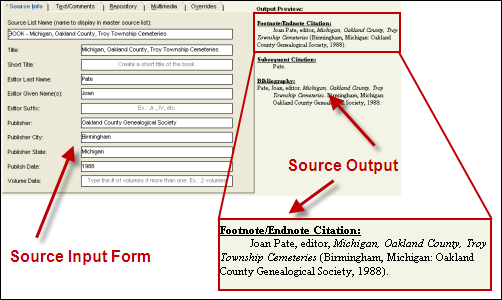
Here’s an example.  The first image shows the Master Source input screen, with the written source at the right.  The second image shows the Source Details.  Notice how the page number has now been added to the source’s output.

mastersource

details

Reports & Such

There are so many reports and things that you can generate with Legacy.  The nice thing is that you can customize them as well.  You can decide to include or exclude various types of information based on the type of report.  For example, let’s say I want to run a quick descendant report for someone that I don’t know very well.  I can chose to exclude all living people from the report. 

In addition to reports, you can create books.  Legacy is set up to produce books that automatically place the details with preset (or customized) verbiage. 

Need to ask people for information?  Run a Questionnaire form, which is a blank form that asks for various details.  Need to interview someone?  Run an Interview sheet.  There are various types to choose from.  What about a research log?  There’s a blank Research Log waiting to be printed.

And of course, you can print charts and family group sheets.

Customization

Legacy offers various ways that you can customize the program to suit your needs.  For example, my color scheme is red, which is not the default.  You can choose the way information is displayed, such as date formats, and surname formats.

Searches

Legacy has a pretty good search tool.  I say pretty good only because I wish it would allow for more conditions, as well as the rules for date ranges.  But nonetheless, it’s a good search tool.  And what’s really nice is that you can save your search criteria if you have a search that you frequently run.

Related Posts

I have written a few posts about Legacy in the past.  Here are two that may be of help to others.

Conclusion

I won’t pretend to be a Legacy guru.  But I am comfortable with the program, so if anyone needs help or has questions, please feel free to ask.  I’ll try my best to help or answer your questions.


Share/Bookmark

Tuesday, June 9, 2009

Saturday Night Genealogy Fun – April 25, 2009

Doing a little catch up here on Randy’s Saturday night challenges.

April 25th challenge:

  1. Open your genealogy software program and search for a "Date Calculator." You could go exploring in your Tools or Options menu, or you could use the Help menu to find it.
  2. Open the "Date Calculator" and put in a death date for one of your ancestors and put in an age at death (use the one you know, or just make one up - we're just testing this feature today). Do the same thing by entering a birth date and a death date in the "Date Calculator" and see how old someone was when they died.
  3. Tell us what software you're using and where you found the "Date Calculator." Tell us the information you found out from using the "Date Calculator."

The wonderful thing about Legacy is that I don’t need the Date Calculator to answer the questions:  How old were they when they died? and How old would they be today?

The screenshot below is the data entry screen for my second great-grandfather.  On the far right, there are two numbers circled in red.  The first number is the age he would be today, while the second number is the age he was when he died.

6-9-2009 11-10-29 AM

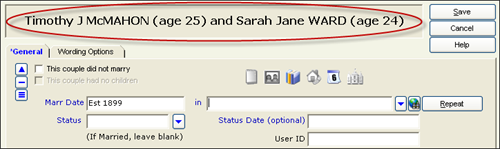
The same can be said for age at marriage.  The screenshot below shows the data entry screen for Timothy’s marriage.  Circled at the top is the age of both the bride and the groom.

6-9-2009 11-18-03 AM

I have had to use the date calculator tool to determine birth dates.  For example, James Mulligan’s death certificate indicates that he died on 8 October 1879 and that his age was 66 years, 9 months, and 1 day.  Using that, I opened the calculator and put in that information (see below).

 6-9-2009 11-24-13 AM

Once I hit the Calculate button, it displays the date I was looking for.  It also indicates that day of the week for each date.  I accessed the calculator through the person’s record while in the birth date field.  So I have the option to put that found date in the field by clicking the Select Date button on the right.

6-9-2009 11-25-53 AM

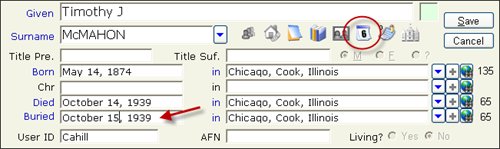
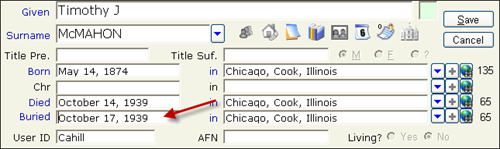
In addition to the date calculator, Legacy also has a calendar, which has come in handy for calculating death and burial dates based on the obituary.  For example, Timothy J McMahon’s obituary was published in the Chicago Tribune on 15 October 1939.  The obit indicated that his funeral will be held on Tuesday.  So in this example, I put the publication date of 15 October 1939 in the burial field and open the calendar.  I find the “Tuesday” and click on it and then click the Select Date button.  His burial is now set to 17 October 1939.

 6-9-2009 11-38-33 AM

6-9-2009 11-40-25 AM

6-9-2009 11-45-41 AM

Did I mention how much I love Legacy???


Share/Bookmark

Friday, April 10, 2009

Weekly Genealogy Blogging Prompt #14

Prompt:  Talk about the different types of technology you use in your genealogy research. Whether it’s a new search engine, a special application, or anything else “2.0,” let readers know what you’re working with, and how it’s working for you.

I love technology.  And the pack-rat in me also loves technology; instead of hoarding papers, I now hoard digital files...lol.  My genealogy setup goes a little something like this...

I use Legacy for storing all of my genealogy data, references, to-do items, and notes.  I am able to export information to Excel if I have a lot of things I want to look at at once. 

My electronic filing system consists of folder for each surname.  Files are then named using the following standard:  SURNAME, First Middle LAST FileType Number (if applicable).  So a picture of me would have the file name:  CAHILL, Julie Marie CAHILL Photo 005.  Each file then has the details added to the Properties, and in particular, I use the Comments field to include source information.  So for example, the death certificate for Timothy McMahon would have the following in the Comments field:  State of Illinois, death certificate no. 28236 (1939), Timothy J McMAHON, State of Illinois Department of Public Health.  I used to break things down into folders for photos, documents, records, etc., but I found that too cumbersome.  The surname folders with all file types using my naming convention works best for me.

For searching, I use Ancestry.com to find as much information as I can about a person or family.  I then try to follow it up with locating primary sources based on the information I found in Ancestry.  Family Search's pilot search has become my new best friend since it has digitized records that pertain to the areas I seek.  I've also found the New England Historic Genealogical Society's databases to be helpful as well.

Then there's good old-fashion newspaper research.  But I like to do most of it from the comfort of my own home using ProQuest.  Lucky for me, I have access to the Historic Chicago Tribune database, which has proven very fruitful in finding information on my Chicago families.  I also have a subscription to Genealogy Bank, which has led to some great finds as well.

My digital camera comes in really handy for genealogy research.  Besides taking photographs of gravestones, I take pictures of mementos and items that are not scannable.  This way I have a digital file of these items.  I also take photos of documents and book and newspaper pages, kind of like my version of a photocopier.  Works really well; I save a few bucks and I have a digital file.

The digital voice recorder I bought last December has also been a great tool.  You can read more at my blog post Using a Digital Voice Recorder in Your Genealogy Research.

Diigo is a tool I started using a few months ago.  In a nutshell, it's a place to store Internet bookmarks.  You can add descriptions and tags, as well as add them to lists you create or share them with groups you belong to.  I use it solely for genealogy bookmarks.  I created lists like Cemetery Research, Irish Genealogy, and General Genealogy to make my bookmarks a little more manageable.  I also share links with the groups I belong to, such as Genealogy Research Resources and Illinois Genealogy.

And let's not forget some of the networking tools.  I've mentioned this before, but part of the reason I joined Facebook and began blogging was because of the wonderful GeneaBlogger group I found.  Through these two tools, I've made connections with other genealogists, and have learned so much from them.  Since I'm fairly new to genealogy, it's nice to have people around to ask questions. I've used FB's instant messaging a few times to ask someone a quick question; really nice to have instant feedback right when you need it.  I get wonderful ideas and tips from reading others' blogs and even FB statuses.  I've also found some distant cousins through these tools.  And of course, I've made some wonderful friends, that some day I hope to meet in person.

There are so many other tools out there that I'd like to explore further, but these, for me, and the the big ones and the ones I though might help others.


Share/Bookmark

Thursday, October 16, 2008

Searching for Events

Our friend, Smallest Leaf over at Small-leaved Shamrock, inquired about how I gathered the information for my new "this week's family events" posts.  So I thought I'd put together a quick tutorial on how I'm doing it in hopes it can help her and others out.

I use Legacy 7.0 to store my family tree information, so I am going to write this based on that application.  I know many of the other programs have similar search options, so I imagine it can be adaptable.

In the Search screen, I set up three search conditions for birth, death, and marriage.  I then use the "contains" option (as opposed to "equal to," "before," etc.) to search for the particular day I want.  I use "contains" because I'm looking for days only and using "equal to" would not yield anything unless it happened to not have a year. 

Using the example below, you can see that I was searching for birth, death, or marriage dates that occurred on September 1. 

search1

Screen capture of Search dialogue box for Legacy 7.0.

You'll notice that I have a comma after "1" and there is a reason for this.  When I ran it initially as "September 1" it gave me results for September 1 AND September 10-19; the comma helps to eliminate that.  Now, the format of the date will depend on how your dates are formatted in your database, so your search criteria could look like any of the following:

  • "1 September"
  • "09/01"
  • "9/01"
  • "9/1"

Side Note:  The one nice thing (that I learned as a result of starting the weekly posting) was that in Legacy, I can save a search and then load it when I want to use it again.  This is great for me so I don't have to re-enter the criteria each time (or remember how the heck I did it, for that matter).

Once the criteria is set, I generate a list of the results.  I'm thinking that this is where many of the software applications differ.  Legacy creates a list for me (as shown below) and I am able to look at the Details (among other things) for each person.

search2

Screen capture of Search List dialogue box for Legacy 7.0.

Based on my search, there were 24 individuals who had a birth, death, or marriage on September 1.  By looking at the Details on the right side, I know which event and have the year.  Now, if you read my post for this week, you noticed that none of these names were on there.  This is only because I decided only to include certain events, in part because not all of the people in my tree have been verified.  That being said, I manually entered pertinent data into my blog posting, since I didn't have very many.  The downfall with Legacy (and perhaps with others??) is that I cannot seem to export the data to anything that could be copied and pasted into a blog entry, but I could print it with custom options (e.g. print only name, birth date, death date , marriage date, and spouse).  I guess the bottom line here is that you may have to play around and see what works best for you.

Again, each software application is different so what I've done here, may or may not be the exact method you would use.  I'm one of those "mess-around-till-ya-figure-it-out" kinda people, so a lot of times, I do "practice searches" on things I know it would find, just to make sure the criteria is set up right.  And of course, we're all different, so what works for me, may not work for you, but I hope that I have provided some insight to help you launch into the "search" world.

Originally posted @ my LiveJournal blog on 4 September 2008.

Julie


Share/Bookmark

  © Copyright 2008~2013. All rights reserved.

  © Blogger template 'Minimalist E' by Ourblogtemplates.com 2008

  Social media icons are from GraphicsFuel.com

Back to TOP  

Related Posts Plugin for WordPress, Blogger...