 I’ve been hearing rumors that a new version of Legacy Family Tree will be released later this year. In fact, Geoff Rasmussen will be discussing it at SCGS Jamboree later today in a demo called “What’s New in Legacy Family Tree 8.” (Boy, I wish that session was being streamed live!!). While I have no details, I do look forward to the Legacy 8 release. In the meantime, I thought I share a few of my “wish list” items.
First, Legacy has been due for an upgrade for awhile now. Compared to many of the other popular programs, such as Roots Magic and Family Tree Maker, Legacy’s user interface looks a little dated. Personally, I could care less. As long as it does what I need it to do and it’s laid out in a manner that jives with my workflow, I don’t really care about aesthetics. There are a few things I’d like to remain the same, but there are also some things I’d like to see changed improve functionality. Here’s my wish list:
Keep Some Things the Same!
Although I imagine there will be some cosmetic changes to the UI, I hope that they maintain the integrity of the program. For example, I hope they don’t change anything structurally in the Family view (pictured below).
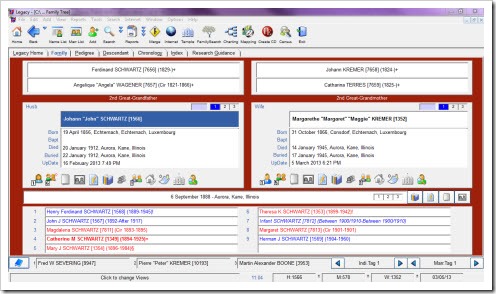
Out of the other programs I have tried, Legacy’s family view is the best, in my opinion. It’s like having a family group sheet on your screen, and I certainly appreciate that visual. I also like that fact that you can customize what data is displayed for the focus couple, as well as how the children are displayed (I prefer the two-column view). This is also the only program (of those I’ve tried) that displays the family in a top-down manner. The focus couple is in the middle, their parents above, and children below. Other programs seem to be going with the side-view, similar to a pedigree chart, and I have a hard time with that.
Another thing I don’t want to see changed is the data entry screen for an individual (pictured) below. I like that the vital stats are called out at the top, while all other events are displayed below. I also like the fact that you can change the sort order of the events to sort by date or name.

Data Entry of Location
I really want to see the location field split into two fields that I can see. In other words, I’d like to see a field for the “place” and the “location” and see both fields.
For example, I want to be able to have a “place” field in the burial information so I can enter the name of the cemetery, independent of the “location” (i.e., city, county, state). This way, my master locations remain manageable and I have consistency with the name of the cemetery.
I would also like this “place” field to function just as the master locations, where you can add notes to the master “place” such as address, directions, GPS coordinates, and/or notes such as previous or other names of the location, and once it’s set up, it can be reused as a master.
Yes, I realize that there are some options currently available (see image below), but it’s a buried (no pun intended) feature and I cannot tell by looking at the screen in what cemetery this person is buried in unless I make it a master location. I would like the notes to stay, as this is where I enter the plot information.

The same can be said for the other vital events, such as place of birth and death (e.g., name of hospital) and baptism (e.g., name of church). I’d also like to see this option for all event types solely to maintain consistency. Sure, I can enter an event for a funeral, and put the church name in the description field, but because it’s not a master, that church name could be altered each time I enter it whether it be for a funeral, baptism, confirmation, or other church event. And again, any information added to the “place” field, such as address, would be carried along. A change of this type would require a lot of cleanup, but I’m okay with that.
Sources
First and foremost, I want to be able to source each piece of an event. For example, if the source I have only gives me a date of birth, but not the location, I want to attach the source to the date piece only, not the entire birth event.
The other thing I’d like to see with regard to sources is the ability to customize the available templates and create new templates. One of my pet peeves is the way some source templates operate.
For example, the US census templates want you to specify the state and county in the master source. However, when you are dealing with a ton of places over many years, that list will grow astronomically! So, I choose to have one master source for each year, and then put the city, county, and state in the city field of the source detail. It of course renders my source citation a little differently, but at least it’s consistent and I don’t have an insane amount of sources, by place, for each census. If I were able to customize the source template, I could probably fix that problem. I could also create custom templates for sources where no template exists, which I could then reuse to maintain consistency.
Either of these changes would require a lot of data cleaning. However, most of us are still cleaning up from the old source system to the SourceWriter system, so, hey, why not. Unfortunately, that’s just they way it works with software sometimes.
Events Attached to Multiple People
Wouldn’t it be great if you could just enter an event for one person and then add other people and their “role” to that “master” event? (Yes, there is a program out there that does this very thing.) It would certainly be great for censuses; add the event to the head of household and attach everyone else to the event (instead of copying/pasting the event for each person). Then, if you make a change to the event, say you made a typo or found new information, it would update it for everyone attached.
This would also be great for events such as weddings or funerals, where you can attached those who attended the event. It would also work well for records such as deeds, where you could attached the grantee and grantor, as well as any witnesses (certainly helps with analysis when using the FAN principle).
Last Words
This isn’t too much to wish for, is it? Guess we’ll find out soon. What about you, do you have a Legacy wish list? Leave a comment and let me know what you’re hoping to see in Legacy 8.






 Imagine my surprise when I opened Christmas presents and discovered the


