Picture

Picture
Showing posts with label Kindle. Show all posts

Tuesday, January 22, 2013

Using the Kindle Fire for Genealogy – GedFamilies

Last April, I posted about the Families app that was designed to work with the software Legacy Family Tree.  Since I use Legacy, I spent the $15 for the Families app and was thrilled.  I always have my database with me.  And, as I mentioned in the April post, it was the only thing I used during my week at the Family History Library in Salt Lake City, Utah.

GedFamiliesA few months ago, the company that developed Families released GedFamilies (Android, iOS, $7.99).  From what I can tell (based on the product description, screenshots, and the “test drive” I took on Amazon) it is nearly identical to Families.  The big difference between the two apps is that Families only works with Legacy Family Tree databases, while GedFamilies works with a GEDCOM file.  That basically means that if you use ANY genealogy database software that can generate a GEDCOM 5.5.1 file, you can use the GedFamilies app and have your family tree on your Kindle Fire.  Just like the Families app, you will need to download and install a syncing program on your computer.

If I wasn’t using Legacy and the Families app already, I would certainly be jumping all over this app.  Since Families and GedFamilies are nearly identical, and the syncing process is almost the same, be sure to read my post about the Families app to get a better idea of how and why I use it.

See also:


Share/Bookmark

Friday, April 13, 2012

Using the Kindle Fire for Genealogy – Ancestry

(This post was updated on 22 January 2013.  Updates are in blue.  Also note that the screenshots in this post vary slightly from the current version of the app.)

You may be aware that Ancestry.com developed a mobile app.  The Ancestry app (Android, iOS; free) is essentially a bridge to your online Ancestry family trees (public, private, and those share with you).  It’s a good app, and mimics the look and feel of your online tree.  You can view your tree, add to it, and edit information.

Kindle-ancestry

I did notice from the reviews of the app though, that there seems to be a misconception about what the app is intended for.  Many people thought that the app was supposed to help you do your research, by granting “free” (remember, the app itself is free) access to Ancestry’s records, Kindle-ancesry1providing you with your dashboard of recent message board posts or recent Member Connect activity, and/or showing you the shaking leaves in your tree for research hints.  Make no mistake, the app does NOT do these things, nor do I believe it ever will.  UPDATE:  The app now shows the shaking leaves for which you can take action on, just as you would if you were on your computer.  But remember, you only have access to the records that are part of your subscription to Ancestry.  Personally, I think it is very difficult to work on the hints using the Kindle (or any mobile device) because it’s hard to maneuver in very little real estate. 

Another thing I noticed, that I don’t believe was available when I wrote this post originally, is that when you click on the little source box (third tab in the image at the right), you will see a list of sources and from there you have the option to “Search ancestry.com to find historical documents about [person’s name].”  All this does is launch your Kindle’s browser and provides a list of search matches.  At this point, you are no longer in the app.  And again, you only have access to records that fall under your Ancestry subscription category.  And while viewing these records is possible, depending on what it is, it’s often very hard to really work with and analyze the record in the limited amount of space.  But, you can save things to your shoebox to review at a later time.  I still believe that the main intent of the Ancestry app is to provide you with easy access to the data stored in your online Ancestry tree.

Why use the Ancestry app?  Plain and simple:  you have access to all your data (assuming your online Ancestry tree is up-to-date) wherever you are.  And assuming you’ve downloaded your tree from the app, it’s still accessible even if you’re offline (you cannot edit it, however, without an internet connection—this is still true).

While I prefer the Families app over the Ancestry app, if I solely used Ancestry for the primary storage of all my research, I’d be singing a different tune.  The app is visually nice and as I mentioned, functions much the same way as the online version of the Ancestry tree.  It’s pretty easy to use, but I was bummed that you can’t make updates to it without being online.  Since it downloads the data when you access the tree (while online) I figured it would allow you to change it and it would save it to the device and sync when you’re next online, but no such luck, even today.  Maybe that will be an update down the road.

If you only use (or primarily use) Ancestry.com to keep track of all your data, then I would certainly recommend the Ancestry app.  Hey, it’s free and it functions well, why not give it a try!

Do you use the Ancestry app?  What has your experience been like?  Drop me a comment and let me know.

See also:


Share/Bookmark

Thursday, April 12, 2012

Using the Kindle Fire for Genealogy – Evernote

Kindle-evernote If you have a mobile device and you use Evernote for any aspect of your genealogy research (or writing), you should also be using the Evernote app (Android, iOS; free).  The app syncs with your online notebooks, allowing you to have access to all that information wherever you are.

Even if you are offline, you can access the information that was stored since your last sync.  You can also make changes and add new notes while offline and it will all sync up next time you’re connected to the internet.

What I love about the Evernote app is that no matter where I am when a though strikes me, I have my notebooks available.  Sometimes if I’m going over a research problem in my head while away from my computer, I can open the Evernote app and review the information I’ve collected or add new thoughts.  I’ve also started to use Evernote to create article outlines and drafts so that I have access to them anytime the spirit moves me (I literally started drafting two of the blog posts in this series Sunday night will watching TV before bed, on my Kindle Fire using the Evernote app).

And did you know that you can send stuff to your notebook while roaming around your Kindle Fire?  In an earlier post I talked about gReader, which I use to sync with my online Google Reader.  If you press and hold on a post from gReader and choose “Send to…,” Evernote is an option.  If you’re in the browser, tap the menu button and choose “Share page” to create a note in  Evernote.

Kindle-evernote1

I’m still fairly new to Evernote in general (although I’ve used OneNote for several years).  So I imagine I will find even more uses for it as I continue to experiment.  And to be honest, I think the web capture capabilities of Evernote and the web app are what sold me on it.  If you don’t use Evernote, I encourage you to take a look at Thomas MacEntee’s explorinar in which he shares several features and uses.  I’m sure it will give you plenty of ideas on how you can use this tool in your research.

Have you tried the Evernote app?  How do you use Evernote (online, desktop, app) for your genealogy research?  What other things do you use it for?  I’d love to hear your thoughts, so leave a comment.

See also:


Share/Bookmark

Wednesday, April 11, 2012

Using the Kindle Fire for Genealogy – gReader

Reading genealogy blogs is important to me.  I find all sorts of useful information, such as genealogy news, research tips, useful resources, and interesting family stories. 

Kindle-greaderFor the last year or so, I was finding it very difficult keeping up with all the genealogy blogs I follow.  It was a combination of a lack of time and the fact that I don't like to sit in front of my computer and read.  I'd fall months behind and was missing a lot of useful information.  I've since found a solution and am now able to stay on top of all the blogs I follow, including non-genealogy blogs.

I added the app gReader (for Android, free), which seamlessly syncs with my web-based Google Reader.  I can do everything in this app that I can do in Google Reader, including starring, tagging, and sharing.  I can also modify subscriptions, rename folders, and subscribe to new feeds.

This particular app appealed to me because the Google Reader app (by Google) was not available for Kindle Fire (it still isn’t as of this posting) and gReader had the best reviews relative to what I was looking for.  I’m very satisfied with it.  I’ve had no problems syncing and I like the interface (I actually prefer it over Google Reader on the web).  There are several ways to customize the interface to make it operate to your particular preferences (e.g. arranging the order of the feed).

A quick note about posts that show up as either title-only or preview-only.  In order to view the entire post, you need to switch to the “web” view.  This is found in the top right corner of the gReader screen.  Below is an example of the “feed” view (left) and the “web” view (right) of the same post.

Kindle-greader-web Kindle-greader-web1

I can read blog posts periodically throughout the day if I choose, or once a day, usually in the evening before bed.  I can't believe how much this simple tool has helped me stay up-to-date on my blog reading.  If you have an Android device, I highly recommend you give gReader a try.

Do you use gReader or another RSS reader app on your phone or tablet?  What do you use and why do you like it?  Leave a comment and let me know.

See also:


Share/Bookmark

Tuesday, April 10, 2012

Using the Kindle Fire for Genealogy – Families

I just LOVE the Families app (Android, iOS; $15).  It’s basically a mobile app for Legacy Family Tree, which is the genealogy software that I use.  The interface is very similar to Legacy so there’s not a big learning curve.  You do need to download Families Sync (free) and install it on your computer in order to transfer the files between your computer and device.
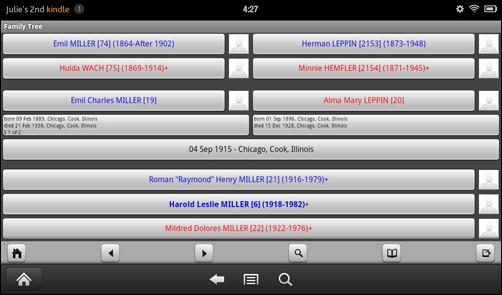
Kindle-families

Because of the Families app, my Kindle Fire is all I need when I’m out and about doing research.  In fact, it was the only thing I had with me during my entire Family History Library trip in February.  My laptop stayed in the hotel room all week and I didn’t miss it at all.  And as I was lugging my laptop (power cord, extra battery, security cable, etc.) through two airports on the way home, I made up my mind that the laptop can stay at home on future research trips (I can do all my email on the Fire or my Android phone).

Kindle-families1 While researching on-site, whenever I need to reference something, I just open the Families app and either navigate to the person or do a search for them.  The app contains the same information as entered in Legacy, including tags, to do list items (individual and general), sources, and bookmarks.  You can also have multiple family tree files.  I’m not sure how big a file the app will support, but mine is 10,000+ individuals and it works just fine (and synched in no time).

Do you need another great reason to have the Families app on your Kindle Fire?  How many times have you been with family (or even at a genealogical society meeting) and the topic of your family research comes up?  Plenty I’m sure, and don’t you just hate it when you can remember specific details?  This happened to me a few times with my in-laws.  But a few months ago, while at the in-laws for dinner, they started talking about their family and asked if I knew this, that, or the other, and I was able to reply, “I don’t know, let me get my Kindle Fire out and look at my database.”  True story!!  And boy were they impressed with the information I had collected over several generations.  I pretty much have my Kindle Fire everywhere I go, so I’m armed and dangerous when it comes to questions about my family history.

I like the Families app better than the Ancestry app (will review soon) for a few reasons, one being that Families is easier to navigate and functions very much like Legacy.  In addition, Legacy is my main database and as long as I sync periodically (or right before a research trip) between my computer and my Kindle Fire, I have pretty current data.  Since my Ancestry family tree is not up-to-date, it really does me no good (right now, my Ancestry tree has 6,968, whereas my Legacy database has 10,307…wow, I’ve covered a lot of ground in a year!).

My biggest complaint is that you can’t see multiple marriages.  On the family screen, it does indicate how many marriages, but there is no way to access a list of spouses and the family view only shows the “preferred” spouse.  So if you want to know who the other spouses are, you have to change to the “timeline” view (it defaults to the husband, but you can click on the wife’s name at the top to see the timeline in her perspective).  I hope the app developers make this available from the family view and individual view in a future update.  CORRECTION:  Linda McCauley (Documenting the Details) left a comment explaining that you need to press and hold on the name of the person and that a window will pop up with the option to switch to another spouse.  Thanks, Linda!!

Even though there is a $15 price tag for this app, I think it’s worth it.  It’s so much nicer to throw the Kindle Fire in my purse and take it with me to repositories than to lug my laptop around.  I highly recommend the Families app.

If you want to know more about the app, Legacy is having a webinar on Wednesday, April 10 at 1:00pm CST, “Genealogy on the Go - the Families App for Your Android, iPhone, iPod Touch, or iPad,” presented by Malcolm Green.  If you aren’t able to attend, a recording will probably be available for about a week or so after the 10th, or you can purchase the recording on CD.

Do you use the Families app?  Do you like it?  Are there any improvements you’d like to see?  Share your thoughts in the comments of this post.

See also:


Share/Bookmark

Using the Kindle Fire for Genealogy – Introduction

Kindle-main My wonderful husband bought me a Kindle Fire for Christmas even though I already had a Kindle Keyboard.  In a few short months I've found several ways to use my Kindle Fire for genealogy. 

Over the next few days, I will post about the various apps I use for genealogy on my Kindle Fire.  Most of these can also be used on an Android phone, iPhone, iPad, and probably other tablet devices.  Here's a list of apps that will be covered:

Please note that I am providing my honest opinions about the Kindle Fire and the selected apps.  I do not benefit in any way for posting information about these products.


Share/Bookmark

  © Copyright 2008~2013. All rights reserved.

  © Blogger template 'Minimalist E' by Ourblogtemplates.com 2008

  Social media icons are from GraphicsFuel.com

Back to TOP  

Related Posts Plugin for WordPress, Blogger...

