Northern New York Library Network: Directory of Archival and Historical Document Collections
Posted from Diigo. The rest of my favorite links are here.

Northern New York Library Network: Directory of Archival and Historical Document Collections


Here are the medals I won in the GeneaBlogger games this time around.
| Go Back and Cite Your Sources | Organize Your Research |
| Expand Your Knowledge | Write, Write, Write |
Randy over at Genea-Musings has the following challenge this week:
If you won grand prize in the Ancestry.com Ultimate Family History Journey Sweepstakes of $20,000 for genealogy travel to places of your choice, where would you go?
Before I got started on this blog post, I headed over and entered to win. It looks like you can enter daily until April 30th. I think they’re running the contest to coincide with the new TV series Who Do You Think You Are?. In addition to the grand prize, 20 World Deluxe subscriptions will be awarded.
So where would I go? I would definitely head to Ireland. I would spend some time at the National Archives of Ireland doing considerable research. Then I’d visit Thomastown, County Kilkenny, which is where one branch of my Irish ancestors came from. Here, I’d probably do some cemetery research and hit some local libraries to learn more about the history of the area.


These are photos of my grandmother’s travel log. She used to write about the trips her and grandpa took, recording not only where they went and what they did, but also the expenses. I hope to transcribe this notebook sometime soon, and will post the transcriptions to my blog. I’m sure it will be interesting to see how times have changed.
Here’s the final tally.
| Task | Status |
| Task 1A – 50 source citations | Complete |
| Task 3A – Organize at least 20 hard files or ancestral items (books, fabrics, inherited items) into file folders, boxes, envelopes, containers, etc.; archival-quality where appropriate. | Complete |
| Task 3B – Organize at least 20 digital files into folders, label, add metadata, add descriptions, add tags, etc. | |
| Task 3C – Organize at least 20 photos into photo albums, scrapbooks, collages, protective holders, boxes, etc. | Complete |
| Task 3E – Create at least 20 data entries in your database, or scan 20 photos, or scan 20 documents. | Complete |
| Task 4A – Use Google Maps to map out an ancestral location. Create a map that you can then embed into a blog post. | Complete |
| Task 4B – Create a timeline related to one of your lines of research, a specific ancestor or location. Get creative using a free application such as TimeToast. Post your timeline on your blog. | Complete |
| Task 4C – Create a memorial page for an ancestor using either Footnote’s Create A Page feature or their Facebook application I Remember. | Complete |
| Task 4D – Visit tutorial and learning pages of popular websites such as Ancestry.com or FamilySearch’s excellent articles repository. | Complete |
| Task 4E – Create a surname visualization using Wordle, Word It Out or a similar application. Post the graphic to your blog. | Complete |
| Task 5A – Write a summary of what your blog is about and post it on your blog – you may not have done this since you started the blog and it is a great way to have new readers learn more about your site. | Complete |
| Task 5C – Prepare several posts in draft mode and pre-publish them. | Complete |
| Task 5D – Write a brief biographical sketch on one of your ancestors. | |
| Task 5E – Create a page on your blog listing surnames, ahnentafel reports or using some other topic. This will help new visitors to your blog understand your area of research. | Complete |
| Task 5F – Participate in a 52 Weeks To Better Genealogy Challenge. | Complete |
Unfortunately, I did not complete two of the tasks I set out to do. But, I think I did pretty good, and I got A LOT done!
Here’s my status for the final days:
I finally opened the boxes of photo sleeves I purchased at the beginning of December (yes I’ve had them for over two months). I purchased several varieties of sleeves that fit into a standard binder. The brand I selected is Print File, which I purchased from Adorama. They are supposedly archival quality, although it does not specify what exactly that means (the packaging states no PVC). I filled up one three-inch binder, well over 20 photos, so task 3C is complete.
I submitted information to the Footnote page created (via SSDI) for my maternal grandparents. I also created the Facebook “I Remember” page for each. Awhile back, I created pages for my dad and his parents. You can visit the Footnote pages for Harold Miller, Marie (Rottman) Miller, Joseph Cahill, John Cahill and Joan (McMahon) Cahill.
Here’s my status for days 7 to 11:
Task 1A – 50 source citations. I spent most of yesterday going back and fixing citations, and I’m sure I did well over 50. This is an ongoing process but I hope to have everything up-to-date by the end of June.
Task 3E – Create at least 20 data entries in your database, or scan 20 photos, or scan 20 documents. I was originally going to scan 20 photos, but I haven’t gotten that far yet. Instead, as I was updating sources yesterday, I also found I was missing some census information for some people and took care of that last night. I did get some record copies over the weekend that need to be scanned, so that will likely be done by the end of the week. Do I get browning points for that ;)
Task 4B – Create a timeline related to one of your lines of research, a specific ancestor or location. Get creative using a free application such as TimeToast. Post your timeline on your blog. I really struggled with this. I purchaced Genelines a while back, but never really used it. I figured this would be a good time to do so, but I was having some problems. I got it figured out yesterday, but wanted to fix some data in Legacy and then run a new timeline. Unfortunately, when I went back today to do it, for some reason it’s not pulling all the events. Frustrated, I simply created a chronology report from Legacy, which personally, is easier to read and decipher. You can read more in my post Working With Timelines.
I’ve got four more tasks to complete to fulfill my goals. I’m hoping I can get it done by the end of the week, but I’m not sure. I have five reels of deed indexes to go through before the films get returned to FHL, so that’s taking priority. Speaking of which, I’m off to go do that right now.
One of the GeneaBlogger Games events is to create a timeline. This really couldn’t have come at a better time, as I’ve been trying to figure out where Aaron WEBSTER and Robert PARKS (both are my fifth great-grandfathers) were before relocating to Oakland County, Michigan in the early 1820s.
According to History of Freemasonry in Oakland County, MI, as well as History and Genealogy of the Gov. John Webster Family of Connecticut, Aaron Webster was living in both Sackets Harbor and Aurelis, New York. The 1820 census for Aurelis, New York confirms this portion, and also places him near Robert PARKS. Unbeknownst to me, they apparently knew one another prior to their move to Michigan.
There are several confusing factors at play here, mainly because that part of New York was undergoing several boundary changes and the settlement of new townships. By creating a timeline, working with Aaron only at the moment, I am able to get a better picture and see what may be wrong with the data in the aforementioned sources. For example, the book on John Webster’s family states that all of Aaron’s children were born in Sackets Harbor (except the last, born in Aurelis). The problem is, according to what I have found so far, Sackets Harbor was not created until 1801, and one child was born in 1799, and one in 1801, meaning they may have been born somewhere else (or the same place of a different name).
Additionally, the timeline helps with the boundary changes. Present day Sackets Harbor is in Jefferson County, however, Jefferson County was not formed until 1805, from Oneida County. I’m not sure if Sackets Harbor became part of Jefferson County at that time, or later (I haven’t found anything yet). But having the timeline, along with boundary changes, I can figure that in some cases I would need to look in at least two different counties for records.

This is the first time I’ve really had to deal with new settlements and boundary changes. These particular families have been in the country since colonial times, but I haven’t really explored that far back as of yet. Once they came to Michigan, things are pretty smooth in terms of location (no major changes) and finding records. All of my other lines were immigrants after 1870 and settled in areas pretty-well developed (e.g., Chicago), so again, not much guesswork.
It will be interesting to see what I learn through this process. I’m going to really have to dig into the history of these areas in order to determine what records are applicable to each family during a given time. It’s going to be a lot of work, but I think I’m up for the challenge.
![GenBlog%20Signature%5B4%5D[6]](https://blogger.googleusercontent.com/img/b/R29vZ2xl/AVvXsEgZT2RBnKLwMUMXvDYcWG_RlcaNS80I7xHus_7KZYB0J3pm9baUeAQx74SEkqT2NsZfB0o-5Ljzc8Kb1s1U9SxNDkyj-TX6ab7tOZToVDsO13ncWGVXNckiCieGHQexwKoYf40J9w8M38uU/?imgmax=800 "GenBlog%20Signature%5B4%5D[6]")
Sources Mentioned in the Article
Charles Fey, History of Freemasonry in Oakland County, MI (Royal Oak, Michigan: Royal Oak Lodge No. 464, 1949).
William Holcomb Webster and Rev. Melville Reuben Webster D. D., History and Genealogy of the Gov. John Webster Family of Connecticut With Numerous Portraits and Illustrations (Rochester, New York: E. R. Andrews Printing Co., 1915), 401-402.
Several months ago, Family Tree Magazine was searching for the 40 Best Genealogy Blogs. Although GenBlog was nominated, it did not make the top 40 list. But, many other wonderful blogs did. To see the list, refer to Diane Haddad’s blog post Announcing the Family Tree Magazine 40 Best Genealogy Blogs.
You can also read more in Maureen Taylor’s article, Fab Forty.
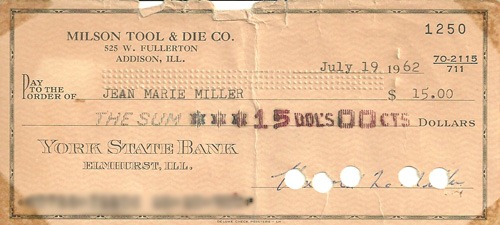
This is my mom’s first paycheck she received while working for her dad’s miniature company. She would have been just shy of 15 years-old when she got this check.
Weekly column sharing genealogy-related things that I’ve learned or found.
Article – Miriam, over at AnceStories, posted an article on digital sources for the state of Connecticut entitled, 52 Weeks of Online American Digital Archives and Databases: Connecticut. Thanks for the resources, Miriam!!
Here’s the status for days 5 and 6.
Category: Expand Your Knowledge
Task A - Use Google Maps to map out an ancestral location. Create a map that you can then embed into a blog post. This was done in conjunction with 52 Weeks to Better Genealogy Challenge #7.
Category: Organize Your Research
Task A - Organize at least 20 hard files or ancestral items (books, fabrics, inherited items) into file folders, boxes, envelopes, containers, etc.; archival-quality where appropriate. As I mentioned in my “opening ceremonies” post, I actually started this a few days ago, converting to the FamilyRoots Organizer system (developed by Mary E. V. Hill). My new batch of folders arrived today so I got to work. I still have a large stack of papers to file, but I made progress!
Category: Write, Write, Write
Task C - Prepare several posts in draft mode and pre-publish them. I pre-published the rest of my Saturday in the Attic posts for February and my Wordless Wednesday posts for March.
This week’s challenge:
Play with Google Maps. This is a helpful tool for determining the locations of addresses in your family history. Where your ancestral homestead once stood may now be a warehouse, a parking lot or a field. Perhaps the house is still there. When you input addresses in Google Maps, don’t forget to use the Satellite View and Street View options for perspectives that put you were right there where your ancestors once stood. If you’ve used this tool before, take sometime and play with it again. Push all the buttons, click all the links and devise new ways it can help with your personal genealogy research. If you have a genealogy blog, write about your experiences with Google Maps, or suggest similar easy (and free) tools that have helped in your own research.
I use Google Maps all the time. I have several maps that I’ve plotted my family’s residences and cemeteries. I had mainly focused on my Chicago families, which is a difficult task since I have to convert addresses prior to 1909 in order to find the correct placement on today’s map. Additionally, many street names have changed over the years, adding an extra step in some cases.
Since I’ve been working on my Oakland County, Michigan folks, I thought I’d do some plotting on Google Maps. Right now, the map includes all the cemeteries were my family is buried, as well as outlines of the land my family purchased through the federal government in the 1820s. This was the first time I’ve plotted anything from a township map on a street map. Fortunately, I was able to find a township map online from 1990 that also included the street names, so I was able to figure it out!!

The nice thing about Google Maps is the Satellite view. In one case, I was not able to find a cemetery because it was not labeled on the map. All I had was a general description of where it was located. I switched to Satellite view and was able to see the cemetery in order to plot the exact location.

You’re welcome to take a look at this particular map of my Family in Oakland County, Michigan, to see how I use this application. Another map that I created to help me with my Emil MILLER research can be viewed here. In this case, I am trying to find applicable Emil MILLER/MULLER/MUELLERs that could be my Emil. I’ve plotted those found in the Chicago city directories in Google Maps, for those who resided close to the church were three generations passed through. There are quite a few, but it’s helped me to narrow down the possibilities based on location to the church.
Last time I was itching to get started, but I must admit, this time around, I’m a little slow getting out of the gate. But I have managed to do a few things. Here’s the current tally.
Category: Write, Write, Write
Task A – Write a summary of what your blog is about. I rewrote my “about this blog” page, since the focus has changed since I started blogging.
Task E – For this task I created a surname page for my blog using Blogger’s new static page feature. I already had a link pointing to a post I did awhile back, but this was a good opportunity to update that list with additional surnames and updated information.
Task F - Participate in a 52 Weeks To Better Genealogy Challenge. I participated in Challenge #6 and will likely do a post for Challenge #7.
Category: Expand Your Knowledge
Task D - Visit tutorial and learning pages of popular websites such as Ancestry.com or FamilySearch’s excellent articles repository. I took a different route with this one and instead visited the Skillbuilding page for Board for Certification of Genealogists. Of particular interest was an article written by Elizabeth Shown Mills, entitled, “Transcribing Source Materials.”
Task E – Create a surname visualization. I created a new Wordle to go with my new surname page.
This week’s challenge is:
Online databases at your public library. Search your library’s web site and see if your card grants you access to online databases. Libraries (even small ones) often have wonderful online tools including genealogy databases, historical newspapers and more! Take some time and play with these little perks that come with a library card. You just may get some help in your own genealogy research and gain some free research tools to boot. If you don’t know how to access online library databases or you’re not sure if your branch has them, ask a librarian for guidance. If you have a blog, discuss which databases (if any) to which your library subscribes.
I am fortunate that my public library subscribes to several databases. Here is a sampling of the resources I have access to, from the comfort of my own home.
HeritageQuest – Provides access to the 1790-1930 US censuses, PERSI, Revolutionary War pension and bounty-land warrants, and family and local history books. I typically use the census portion when I can’t find what I need on Ancestry, since each was indexed by different people. Sometime I get lucky and find it on HQ, other times I have to get creative on Ancestry. I’ve also started to look into PERSI, but have yet to find anything relevant to my research. Until Footnote came along, this was a great source for ARW pension files, however, not all papers are included on HQ, whereas Footnote has the complete file available.
ProQuest Historical Newspapers – My library subscribes to the Chicago Tribune historical collection, which is fantastic. I’ve been able to find several of obituaries and articles about my relatives using this database while in my PJs at home. It’s wonderful!!
Historic Map Works – This is a collection by ProQuest that has a ton of maps and atlases. This was something I just discovered a week ago. I have no idea if it was available before or if it’s a new subscription, but nonetheless, it was a great find. I’ve already located some old atlases of Linn County, Iowa, which list my ancestor’s land.
My library has a subscription to America’s Newspapers from NewsBank, which contains several newspapers that are more current. I don’t use this database very often. My library also subscribes to Ancestry, although only accessible in the library.
I’m very thankful for the Chicago Tribune historical newspapers being available with access from home. It has been a tremendous help to me during my research. And I can’t wait to explore the map collection further.

So let the games begin!!!
My Flag
I’m using the same flag I created last year. My flag represents the American, German, and Irish heritage of my family.
My Events
Go Back and Cite Your Sources – I will be going for Platinum again, which requires 50 citations. After the last games, I’ve been pretty good about sourcing information. However, with the update of Legacy, which included SourceWriter, I still have many sources that need to be updated to follow the correct citation format. I’ve been working on updating them periodically, so this event gives me motivation to do at least another 50 within the next two weeks.
Organize Your Research – Going for Diamond again. I will be completing Task A (organize 20 hard files), Task C (organize 20 photos), and Tasks E and B (scan 20 photos and organize them). I actually started Task A a few days ago, converting to the FamilyRoots Organizer system (developed by Mary E. V. Hill). I’m maybe about halfway done, but ran out of folders. It will be finished once I get new folders. I’ve been procrastinating on Task C, so this event gives me the motivation to get a move on…I have all the materials to organize my photos, just haven’t sat down to do it. Tasks B and E will be done together…I always have plenty of photos to scan…not sure that will ever end!!
Expand Your Knowledge – I’m going to try for Platinum. Some of these I already do, but there are always more ancestors to work with, so I’m pretty sure I can do Tasks A, B, and C. Task D has been on my to-do list for awhile, as there are many sources out there that offer help and guidance. As for Task E, I already created a Wordle, but I think I want to create an individual one for each of my grandparents’ lines. Plus, I may try the Word It Out application this time around.
Write, Write, Write – I’m going for Platinum. Last time, I completed Task A, but my blog has grown so much since then, it’s time to do it again, and create a separate page for it (now an available option for Blogger). Task C is no problem, as I pre-publish my Tombstone Tuesday, Wordless Wednesday, and Orphan Photo posts. I haven’t decided who to write a biographical sketch of for Task D, but I will get it done. I’m excited to complete Task E, since the new feature on Blogger lets us create static pages. Currently, I have a link pointing to a post with a list of names, but I want to create a separate page with more information. I hope to participate in Task F. In fact, that reminds me, I didn’t do Challenge 6 yet!
This is a Valentine’s Day card from my grandmother, Marie ROTTMAN Miller, to my grandfather, Harold MILLER.


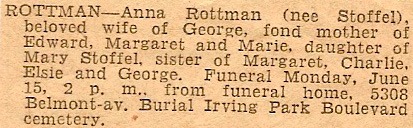
This is the obituary for my great-grandmother, Anna E STOFFEL Rottman. She died on 12 June 1936 in Chicago, Cook, Illinois.
Weekly column sharing genealogy-related things that I’ve learned or found.
Maps – Through my public library, I am able to access a map collection called, Historic Map Works, distributed by ProQuest. It is a HUGE collection of maps and atlases. Check to see if your local library subscribes to this database…I’m sure you will find plenty of maps to help you in your research!
Blogging – Thomas MacEntee reported on a new feature available for Blogger blogs; the ability to create static pages. Head over to GeneaBloggers to learn more about the feature and how to use it.
TV – The big news recently has been the upcoming premier of Who Do You Think You Are? on NBC, which is set to debut on March 5th. The official site was launched this week, with the following blurb from the “About” page: “Viewers are invited to take an up-close and personal look inside the family history of some of today's most beloved and iconic celebrities….” I think since the website is live, and I saw a commercial for it on Tuesday (yes, while watching the Biggest Loser), it’s pretty much a done deal and will finally debut as scheduled.
News – An RSS feed option is now available for the Member Connect feature at Ancestry.com. Read the article to learn more and to learn how to activate it.
Article – Sue Edminster shares the results of a handwriting analysis of her great-grandmother in her article, Bridget Shane Handwriting Analysis, at her blog Echo Hill Ancestors. It’s quite fascinating how much can be learned by analyzing the handwriting of an ancestor.
eBook – Our very own Elyse Doerflinger has written her own eBook on organizing your paper genealogy files entitled Conquering the Paper Monster Once and For All. For more information on the book and how to purchase it, visit Elyse’s Genealogy Blog.
Julie is a genealogist who specializes in writing, editing, and graphic design. If you are looking for someone to help organize your family data into a book or prepare a research article for publication, Julie can help. Other services include the development of educational materials such as books/booklets, articles, and online courses. See "About Julie" for additional information.


Using Historical Newspapers for Genealogy Research

Lineage Societies and Genealogy

Researching County Histories

US City Directories


Join me at the FGS 2013 Conference in Fort Wayne, Indiana, August 21-24.


© Copyright 2008~2013. All rights reserved.
© Blogger template 'Minimalist E' by Ourblogtemplates.com 2008
Social media icons are from GraphicsFuel.com
Back to TOP

![GB2010_Platinum[1]](https://blogger.googleusercontent.com/img/b/R29vZ2xl/AVvXsEhdUamDZQnOFQ5qJNwf0B2lJ88u-QJykJ_nZqmWPW2jaFACaQ_U9PjjRWXOvElCTetJKmrGWsYr7n_mm40ldMQoYz6ZPTzGeMKB_oCZQs8O93la-bd4WA8_WN9pdVTEQqU8_83qlAyGUk89/?imgmax=800 "GB2010_Platinum[1]")
![GB2010_Gold[1]](https://blogger.googleusercontent.com/img/b/R29vZ2xl/AVvXsEg5LIGKoEN9_QJvRs3G1UiK_NCeo1nzjbrXsbyxhNRYSVuEqhxTjPaj-P-56WAWnCpNbsF9MGMNWssVeUZFzqX_qtUkSX0ly8vpytZvlidTuebq1YwFs3UlWWBJLgIID1Q0a1Ow0QASmLP6/?imgmax=800 "GB2010_Gold[1]")
![GB2010_Platinum[1]](https://blogger.googleusercontent.com/img/b/R29vZ2xl/AVvXsEh93TqfvLpx0_Zg3AE05RT3AYslZlV_ZC6ssN4pu_epQeGsCIqfBb2dxsEbEPii9maCLa9C3ogfDXSrjQUCEF_RdoMM4wvMNMpOz91XKQoKFrPcSXfynABGu7P42CoL7xoWxnHbk9MLG8KK/?imgmax=800 "GB2010_Platinum[1]")
![GB2010_Diamond[1]](https://blogger.googleusercontent.com/img/b/R29vZ2xl/AVvXsEhy6yoIO7BKzPRj4PjPTMP4CbS4-nk3hb6pdf5zQnqFe7mEkJ4eNLh4sMdg0Voq9MTxOZv-K5MnkkPbPnBfBkSM6LKzkgjNpTKneeQpFdnP1oCNUYxE0n8GNf2geLcyBYfezv91OhWqKng3/?imgmax=800 "GB2010_Diamond[1]")
![GenBlog%20Signature%5B4%5D%5B7%5D%5B2%5D[1]](https://blogger.googleusercontent.com/img/b/R29vZ2xl/AVvXsEgmcKZm_sHHlZulUSL-oGub6xh16N9eQ-ZKdXhUwJAHVAW5SFO5I7o9f_09RFk4fHEjM5NkiGp0-AwYb5Fm1eJsgJLKnOPUgjbq6O3SCr3LPI5Ti_b2kGvT68bocsgn71I9moTDLeFHKylE/?imgmax=800 "GenBlog%20Signature%5B4%5D%5B7%5D%5B2%5D[1]")
![GenBlog%20Signature%5B4%5D[8]](https://blogger.googleusercontent.com/img/b/R29vZ2xl/AVvXsEhFo792w-sSOctkh-7PyNyqVglI-_QCyUjKJPdhNsOvfT6YgE68QdZSx2XX-xSvU8oH860CefZ1FjoMwm9xJWHSlR3Q6lqCP5_3aWQFBvnsFMR4GrxQGiQwfV6GCxt2HaaN8cvt-gN3kLOH/?imgmax=800 "GenBlog%20Signature%5B4%5D[8]")
![GenBlog%20Signature%5B4%5D[4]](https://blogger.googleusercontent.com/img/b/R29vZ2xl/AVvXsEg7HyDeLZm5EQKhHM_mZxHY09TMzbTVV56qv06Bi_vH8K66OwF4SGD2zPWBFcDam-dzYehyT1ktJU6qT7T3_XTV78UtbnXIZlI_ImvZ5KseEvV7m7-xCTCivuHmh5fVM0LAsoWSi89bRv1u/?imgmax=800 "GenBlog%20Signature%5B4%5D[4]")
![GenBlog%20Signature%5B4%5D[7]](https://blogger.googleusercontent.com/img/b/R29vZ2xl/AVvXsEgD1KjUf3fXTAvdp7XNRhG7Or-NadARK5tnbX1mlV2iHBZSvvqx6t-RX4_ejRS8bqV8-FZ7SIGiXZJMt-9dUqjKh2mV37-rNTbhuDIUHBtbAGLPdJhnqzY2nfcJU601yt7ntKHWCJ8BbHBt/?imgmax=800 "GenBlog%20Signature%5B4%5D[7]")
![GenBlog%20Signature%5B4%5D[8]](https://blogger.googleusercontent.com/img/b/R29vZ2xl/AVvXsEja5SBxDkazlYurmCiZK3HNAY4r3uKupXUcEzQdsSG9keuvCOaM1ZnTAsaAEggS8EwbDoUwfceZ0xZKaDbCpHAms9F8tVVHNTEy9HK_8wDgGfYzWjED0AfCwQs6xWN9o4XYpESicoTIu38T/?imgmax=800 "GenBlog%20Signature%5B4%5D[8]")

![GenBlog%20Signature%5B4%5D[3]](https://blogger.googleusercontent.com/img/b/R29vZ2xl/AVvXsEhlpXqq7_ouoQccmKPnAEJXJbjfak4tuoTXf0q-yWH8bkZoxjFoB6Bmu-fiTFTYdJEdPehtvANTAtORosDLE3JLzewSYXgycmQs3hwIvu8Gya73Ln89XceIHntswPWRTus-RiNFPMWBntYS/?imgmax=800 "GenBlog%20Signature%5B4%5D[3]")
![GenBlog%20Signature%5B4%5D[8]](https://blogger.googleusercontent.com/img/b/R29vZ2xl/AVvXsEjBdROBUXhvNtkXJ4y6yArB2JfqeFK7bQvxMoMscrZgFlZfanzPF8ju36G4uMLUfw-JgxHjncASgXLsXaTcpqcpUWxrhu0YIjeUkcrWl9037X1-lXSS5_1ptWupDPpn6A2hrlH0ZVdXrqFq/?imgmax=800 "GenBlog%20Signature%5B4%5D[8]")
![GenBlog%20Signature%5B4%5D[5]](https://blogger.googleusercontent.com/img/b/R29vZ2xl/AVvXsEjB2XtigWIkfMa1RV6LeX0n9CCIo2rrYHFt-NaTx13n5iFHTsSM-22wRahDPT899ID0nrfkijrCp26kqPiA35SXY2csJ-LwE3Be1lkWWuNEUDS0gterpnjQOmfw1_t-z3eaf6TkF85YW1Fy/?imgmax=800 "GenBlog%20Signature%5B4%5D[5]")
![GenBlog%20Signature%5B4%5D[6]](https://blogger.googleusercontent.com/img/b/R29vZ2xl/AVvXsEgdO5OKYNmyBSIc0H6LIgvznMI8eV_T4PFAiIAWI61kmS0nt4sNvjgIdjn7eedQl7ZNEaCE1AvxDByOBfbpts6dvYJSYV_d4lQQwxJYNV84O-1akFr3uWuJZDT-wuwhvIWn2rDmW2ZnFVPd/?imgmax=800 "GenBlog%20Signature%5B4%5D[6]")
![GenBlog%20Signature%5B4%5D%5B2%5D%5B2%5D[1]](https://blogger.googleusercontent.com/img/b/R29vZ2xl/AVvXsEjzOrgr1Ds0t9wZttxDTSvibVinc7uIP5gjo7WBUx5l7IvDVjQs_6cbTbfRm9sDL7fcPjPkgQ8XARZlsBkjT6u8R_mAoabcu_0ls96V7GZSwqcP7dwH9fWXGzXGtJb4zZq_k6LJYYSZM45D/?imgmax=800 "GenBlog%20Signature%5B4%5D%5B2%5D%5B2%5D[1]")
![GenBlog%20Signature%5B4%5D[6]](https://blogger.googleusercontent.com/img/b/R29vZ2xl/AVvXsEj754vlzCFLOvhfGfNGokqFT1ZTorShChOdlFHMK4CcJfM94erigAXvOAj1AM-0h7F-CELOe0Qfqg2FBkDI3Ut9m13m9R3curwRdyKEHunY3TJidDsC2yTwJSw2ivm4B2B-DTbAoKHCKHDv/?imgmax=800 "GenBlog%20Signature%5B4%5D[6]")

![GenBlog%20Signature%5B4%5D[4]](https://blogger.googleusercontent.com/img/b/R29vZ2xl/AVvXsEgiViESDmaOgD71wvpH-3X5ZujsRI-ZqmcifIn9CuiEr44wUTnycDiPGAqheFq9toXZOjVEs27tHbQ_qgshfY5HOzH7DofijpoK3ZDo0kJKkIh8uQrgwr3l2Wk45fxcw_IecW0-TC3pSJlY/?imgmax=800 "GenBlog%20Signature%5B4%5D[4]")
![GenBlog%20Signature%5B4%5D[5]](https://blogger.googleusercontent.com/img/b/R29vZ2xl/AVvXsEhD1XRXURjaeWXwR2A4nzhW_QdPrXel86gDY8jDUPwU2gHseGkm62_chsHawk-aYepulxsA9xST_Jdx3UhlLUN_5e_8P-Dsp0uGRKgSTvLRQeWKUCFnPRi8rhlF0OWp2XUZDscz7NnEq_Zv/?imgmax=800 "GenBlog%20Signature%5B4%5D[5]")
![GenBlog%20Signature%5B4%5D%5B4%5D%5B2%5D[1]](https://blogger.googleusercontent.com/img/b/R29vZ2xl/AVvXsEjLzLMdQtiL600NiJQVrdqIDqYAYke6FVaJiWs2PRQT2vY_MNKb-q3se892Ax4uM2kYEJuwsb-spaxNqKpoxdE47Sp3LPkBDCLBYgDTdTvk5UkpWhQdiyV8ovAT_SQW4Wr1h32wHs1J0SK4/?imgmax=800 "GenBlog%20Signature%5B4%5D%5B4%5D%5B2%5D[1]")
![GenBlog%20Signature%5B4%5D[4]](https://blogger.googleusercontent.com/img/b/R29vZ2xl/AVvXsEilGy0BRxeylD_MPdGjRpw9oeIytdioZYKJeFh95SJ_4Y_rkbismJrKOBx2E2cWls73omg7KKpIqpXrlZk7sj2-j1hgykA-z6qJfHvFpLrN-at-ZFBP3K6rb1peUWISEAxzAisGlraWJN_b/?imgmax=800 "GenBlog%20Signature%5B4%5D[4]")

![GenBlog%20Signature%5B4%5D[5]](https://blogger.googleusercontent.com/img/b/R29vZ2xl/AVvXsEgcO4gqI5bcj__PMHpxdJ59uBp9KthzCeulvgwwPmAevh07QLEZ0egul_WGQr1jWP9D1DbwesTQ3hCca9ondFvcwnYWKHTtQbpGnpCNQtC9vL6ohakhUnXs9kJCpkQmDOCWM1sZ6JD0-NvL/?imgmax=800 "GenBlog%20Signature%5B4%5D[5]")
![GenBlog%20Signature%5B4%5D[2]](https://blogger.googleusercontent.com/img/b/R29vZ2xl/AVvXsEindhKUDn8lUcUJIZsLhRi_9DgPOZohIiemgMlfuODlIdhYoVjwYXtMyY3H3ILCZRXO-kKgKKHwvMlKqaOm4EI6_ZemC_WbqwGuU6EWbbpj_lbk-CY0FybsOI4v77KFosW3MsAxkvB9gevE/?imgmax=800 "GenBlog%20Signature%5B4%5D[2]")

![GenBlog%20Signature%5B4%5D[3]](https://blogger.googleusercontent.com/img/b/R29vZ2xl/AVvXsEhs1LKpXyhtB677SlLXwgd4M_DjgAazojdOjx8Y2Xg3Py4LdvmuvedFa1Khx8QxK_5AiC5aujNK1ClNG32TUtf-h1iQvxVa8Er-e5WdG7uswACGShBr4xXnTcnyKdvxOMIKA7uyUQ8gaS8q/?imgmax=800 "GenBlog%20Signature%5B4%5D[3]")
![GenBlog%20Signature%5B4%5D[2]](https://blogger.googleusercontent.com/img/b/R29vZ2xl/AVvXsEisYgzdMnV_M-wQ6dmdkwgDyeoQy31cwJLdpoUDGoJKwxbFZo-9wgOOcHGAKjKcJ88CDPzcOMIgfw9Q4Rx_OYj2zSODoKXMSEHR7bdjSDEAqSfeEXhr3L1yaUb5eHxJBqFGhLEwp0MdITPl/?imgmax=800 "GenBlog%20Signature%5B4%5D[2]")
![GenBlog%20Signature%5B4%5D%5B3%5D%5B2%5D[1]](https://blogger.googleusercontent.com/img/b/R29vZ2xl/AVvXsEhb1gkGjrpyJzRHdvm44XrJK8EayGH00dJ0y-cmkmDIjWei4_1CsqR7nVV-WONAMR-S8AHLHBHA2M8IKy354eHZ0GGqcp4bMKR9rsqI-RAgaSUC4bY4IrRBz5SsqBjbott50Qcvy8vl-QEt/?imgmax=800 "GenBlog%20Signature%5B4%5D%5B3%5D%5B2%5D[1]")

![GenBlog%20Signature%5B4%5D[2]](https://blogger.googleusercontent.com/img/b/R29vZ2xl/AVvXsEg1u3xqfhQJ4mbs8LlMIqaO3fgqYfbx6-tINOg37jwFX2apqB4Ywxr6elrmJLRD9YzGjnwD-H6rVDSyv-IpjVUXRAdklj4Y0PeadQu6l8Q6Lbxx1L-v77jOrgfqQZtkjVP4sNErd6cxS7kI/?imgmax=800 "GenBlog%20Signature%5B4%5D[2]")


