
Like many of us, I have several photo albums where the photos are helplessly stuck to the pages. Removing them can damage the photos and trying to scan a giant (not to mention heavy and awkward) album on a flatbed scanner is difficult and time-consuming.
Thus the beauty of the
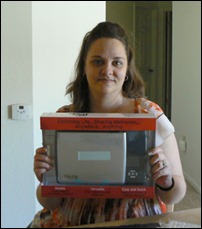
Flip-Pal™ Mobile Scanner. All you have to do is lay it over a photo, scan, and move onto the next. I did an entire photo album in about an hour, while sitting in my recliner watching TV (30 pages, double-sided, 6 photos per leaf…that’s 360 photos!!!). Sure beat trying to maneuver the album on a flatbed scanner, which I tried to do several years ago and gave up.
 |
Yuck! Look at that nasty glue!! These photos will never come out in one piece… believe me, I’ve tried all the tricks.
|
I was also able to scan my parents wedding album, where the photos are fixed between the the mattes that make the page. It took about 15 minutes to do the entire album. And I have other albums and scrapbooks that I will be working on in the near future.
One of the things I’ve been wanting to do is create a digital scrapbook for my mom. I made a photo album/scrapbook for her 50th birthday several years ago. At the time I was young and naive (not doing genealogy, nor understanding the concept of preserving family artifacts) and of course used original photos, a non-archival photo album, tape, stickers…you get the idea. It was very unorganized, some people weren’t identified, and I even put in a group photo from my dad’s 7th grade class thinking it was mom’s. So now that I know much more about her side of the family, I thought it would be nice to create a new and improved scrapbook, of the digital kind, and incorporate some of the family history this time around.
While this will be a time-consuming project, I wanted to experiment on a smaller scale first. I created a quick digital scrapbook with a wedding theme. The idea of a small digital scrapbook would certainly make a quick and simple gift for someone. Here’s a synopsis of what I did:
- I used my Flip-Pal™ Mobile Scanner to scan the photos I wanted to use.
- Using Photoshop CS3, I created scrapbook pages for each wedding couple. The scrapbook designs and elements came from Raspberry Road Designs.
- I saved each file as a JPG in addition to the native PSP file.
- Then, using PowerPoint, I brought in the JPG files and placed them each on their own slide. (Note: Since my images were 6 x 4 inches, I modified my slide size to match.)
- Since there are only a few slides and there aren’t a lot of details in them, I set slide transitions and a timer so that the presentation will run on its own (the user can still move back and forth as desired).
- I saved the PowerPoint file as a “PowerPoint Show” (.ppsx extension) so that it always opens in slide show mode.
- From here, I can put it on a CD, DVD, flash drive, or even email it to someone (this particular one is small enough to email). Even though someone may not have the PowerPoint software, they can download the PowerPoint Viewer, which allows them to view presentations.
For my purposes here (to show you the scrapbook), I’ve uploaded the digital scrapbook two different ways:
- As a .ppsx file, which is accessible here (you will need PowerPoint or the PowerPoint Viewer to view it). This is how it would work and look if I put it on a CD, flash drive, etc. It’s also the best way to view it at the appropriate size for quality purposed.
- At SlideShare, which is a website for uploading and sharing presentations (it’s free, with upgrades available). I’ve embedded it here.
I’m sure there are programs out there that can help you make scrapbooks, digital or otherwise. These were just the tools I had available. And for me, it was a very simple, quick, and inexpensive way to create a heartwarming gift.
An alternative to this is something I did a few years ago for my grandaunt. She mentioned that she didn’t have many photos of her younger years due to a house fire. So when I went out to visit, I used Photoshop and scrapbook elements from Raspberry Road and made 8 x 10 “scrapbook pages” that I had printed at Kinko’s. I then bough inexpensive 8 x 10 frames, framed the printouts, and gave them to her as a gift. She loved it! You can read more about it and see the images at my post
For My Grandaunt Flo at Christmas.
Next week, I’ll share another simple gift project: Family Tree Photo Collage. And don’t forget to check out what the other Simple Gifts Blog Hop bloggers are doing.
Disclosure: I was selected to participate in this project and by doing so I received a Flip-Pal™ Mobile Scanner to evaluate.

 With the holidays drawing near, the Flip-Pal™ mobile scanner has been the topic of discussion as people are scanning photos to create homemade holiday gifts. Last year, I was fortunate enough to receive the Flip-Pal™ mobile scanner for free in exchange for participating in the Simple Gifts Blog Hop. I ended up doing two projects:

 A few years ago, my husband got me a really neat Christmas gift, a family tree figurine with little hanging frames for family photos and a place to have it engraved. As a budding genealogist at the time, this was certainly a thoughtful gift. But, and I hate to admit this, I never actually replaced the photos with my own family photos, until the other day.

 Well, Happy Halloween to me! Boy did I get a treat!


