Picture

Picture
Showing posts with label Columns: Family History Through the Alphabet. Show all posts

Wednesday, July 10, 2013

Family History Through the Alphabet – X Marks the Spot

For 26 weeks I will take you on a family history journey through the alphabet, one letter at a time.  I have decided that each post will be educational in nature, focusing on topics related to resources, methodology, tools, etc.  Although the challenge is complete, there are still some people who are finishing up and Alona, the host, is encouraging others to participate anyway.  Additional information on the challenge, can be found at Take the ‘Family History Through the Alphabet’ Challenge


xThis week it’s all about maps.  I love maps.  They are great tools for genealogists and often help us solve research problems.  In this post, I’ll share a few examples of how I use maps in my own research.

Plotting Land Owners

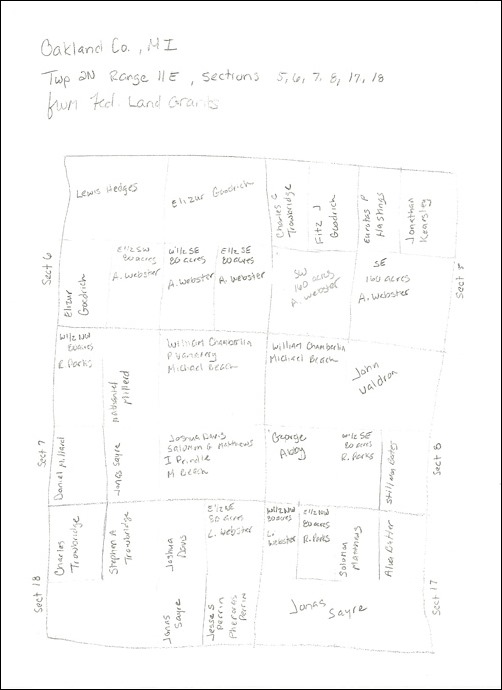
For rural dwellers, creating a map of our ancestors can be very helpful.  We can visually see what parcels of land a they owned and who their neighbors were.  This can help solve many mysteries.  For example, when I plotted out part of a township where both my fifth great-grandfathers, Aaron Webster and Robert Parks, owned land in Oakland County, Michigan, I saw several familiar surnames.  One of Aaron’s daughters married Zadock Bates and the other married Erastus or Orestes Millard.  Both of these surnames appear in close proximity to the land that Aaron owned, so it’s possible that the daughters’ spouses are related to those nearby families.  I created a map by simply drawing it out using the land descriptions for all the federal land grants in the sections I was interested in.
OC-map

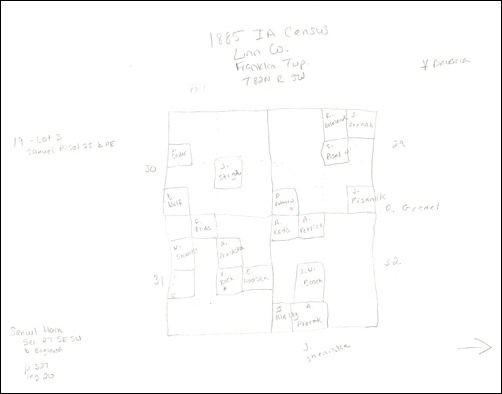
In another instance, I was trying learn the origin of an Iowa family, who had apparently previously lived in Georgia, Pennsylvania, and Missouri.  Using the 1885 Iowa census, which includes the place of birth for each person, as well as a land description, I decided to plot the family’s neighbors who were in the same place and the same time in hopes of finding connections between the families in other locations.  For example, one neighboring family had a child born in Missouri in 1874, as did my family.  While I haven’t been able to actually solve this mystery, I am hopeful that researching the neighbors further will be of help.  Again, this one is a hand-drawn map, but I only plotted families with similarities to my family (I can always go back and add in the rest).
LinnCoMap

Plotting City Residences

In addition to my rural folks, I have a lot of city dwellers, particularly in Chicago.  I use Google Maps all the time for various reasons.  For example, plotting the family on a map can help you figure out what churches to search.  I had my Ward/McMahon family mapped out for different reasons (comparing locations to other possible family members), but when the Catholic church records for Chicago became available through FamilySearch, I decided it was time to do some digging, but I had no idea where to begin. 

Looking at the map I had already created, I began to go through all of the Catholic churches listed at ChicagoAncestors and determine where each had been located and the years of operation (I could have used city directories for this as well).  Once I identified a possible church, I plotted it on the map.  If I found that an event had occurred for the family, I added the details to the map’s location description.  Here’s the map I created.  If you click through to view it on Google, you will see the descriptions of all the pins and see how I have it organized by family and year.


View Wards/McMahons in Chicago in a larger map

I’ve also used Google Maps to help with foreign research.  For example, I had some Luxembourg families that were apparently in three different communes in two different cantons.  Seeing them all on the map, I realized that they were actually pretty close to each other.


View Luxembourg in a larger map

And you can read about my map project for my Prussian research here.

Boundary Changes

Maps are especially helpful in discovering boundary changes.  These changes could be at any level, including territory, state, county, etc.  One tool that I like is AniMap.  In the following two images, you can see how the county boundaries changed for New York from 1794 to 1799 and one of the places I research belonged to two different counties, thus two different places to research.

Auburn1794

NY1799XP

Wrap Up

These are just a few examples but I hope that this post gave you some new ideas for using maps in your genealogy research.  If you’d like to share how you use maps in your own research, please leave a comment—I’d love to hear other ideas!


Share/Bookmark

Wednesday, July 3, 2013

Family History Through the Alphabet – Writing

Family-History-Through-the-Alphabet

For 26 weeks I will take you on a family history journey through the alphabet, one letter at a time.  I have decided that each post will be educational in nature, focusing on topics related to resources, methodology, tools, etc.  Although the challenge is complete, there are still some people who are finishing up and Alona, the host, is encouraging others to participate anyway.  Additional information on the challenge, can be found at Take the ‘Family History Through the Alphabet’ Challenge


wThings are a little crazy this week as I migrate my blogs from Blogger to Word Press.  So for this week, I will direct you to a few of my past posts about writing and publishing.  Enjoy!


Share/Bookmark

Wednesday, June 26, 2013

Family History Through the Alphabet – Volunteer

Family-History-Through-the-Alphabet

For 26 weeks I will take you on a family history journey through the alphabet, one letter at a time.  I have decided that each post will be educational in nature, focusing on topics related to resources, methodology, tools, etc.  Although the challenge is complete, there are still some people who are finishing up and Alona, the host, is encouraging others to participate anyway.  Additional information on the challenge, can be found at Take the ‘Family History Through the Alphabet’ Challenge


vVolunteering for genealogical societies is a great way to give back to the society.  It also gives you a chance to meet new people who share your passion for genealogy and allows you an opportunity to learn from those around you.

There are many ways you can get involved with a genealogical society:

  • Serve as an officer.
  • Chair or participate in a committee.
  • Help with special projects such as indexing or transcribing records.

Some genealogical societies are really good about letting members know what their current volunteer needs are, usually through their newsletter or website.  Others don’t communicate their needs very well and that doesn’t mean that they don’t have any opportunities available, they’re just not sure how to ask for help.

For societies that do announce their available volunteer positions, contact the person indicated and inquire.  In cases where you are not sure what might be available, contact the president of the society and ask.  They will either tell you what’s available or they will direct you to the society’s volunteer coordinator.

When you find a position that interests you and suits your skills, be sure to ask what is expected of you.  Do you have to attend meetings and is travel required?  About how many hours a month does the position require?  Are there procedures in place and can you review them before accepting the position?  Knowing the answers to these types of questions will help you decide if the position is right for you.

Genealogical societies rely on volunteers to keep their society running smoothly and provide value to its members.  The more volunteers a society has, the better their chance of survival in this day and age.  So often life pulls us in so many different directions it’s hard to be one of only a small number of volunteers that manage a society.  This leads to burnout and ineffectiveness.  The more hands on deck means work is spread out among many and not concentrated on a small few.  This keeps the society functioning to the best of its ability, fulfilling its mission, and serving its members.

Your Turn

Do you currently volunteer for a genealogical society, or have you volunteered in the past?  If so, what is/was your experience like?  If you have not volunteered for a genealogical society, how come?  Please share your thoughts and experiences in the comments of this post.


Share/Bookmark

Wednesday, June 19, 2013

Family History Through the Alphabet – University Libraries

Family-History-Through-the-Alphabet

For 26 weeks I will take you on a family history journey through the alphabet, one letter at a time.  I have decided that each post will be educational in nature, focusing on topics related to resources, methodology, tools, etc.  Although the challenge is complete, there are still some people who are finishing up and Alona, the host, is encouraging others to participate anyway.  Additional information on the challenge, can be found at Take the ‘Family History Through the Alphabet’ Challenge


uUniversity libraries are probably one of the most overlooked repositories when it comes to genealogy research.  But the universities in the states in which your ancestors lived should definitely be on your list of places to look.  These libraries usually contain special collections or archives related to the history of the state as well as the areas surrounding the campus.  Even better, many universities are digitizing their archival collections and making them available to the public for free.

Visiting a university library’s website is probably the easiest route to discover what materials they have in their collection and if they have anything available online.  For example, when you visit the Special Collections & Archives page of the University of Idaho Library’s website, you can see that they have four categories of special collections, including historical photographs and manuscripts.  You can even access their digital collections from this page.

Some libraries also have finding aids written specifically for genealogists or historians, such as Guide to the Genealogical Manuscripts Collection MS 234 at Yale University Library.  The collection is described as “an artificial collection of manuscript and printed genealogical material and genealogies on Connecticut area families, ca. 1600-1980.”  The Yale University Library has also put together research guides on a variety of topics such as Witchcraft and Society in Colonial America.

Probably one of the best digital collections put online by university libraries is Iowa Digital Library, which is a project of the University of Iowa Libraries.  There are so many wonderful things to explore, including maps and atlases, diaries, and photographs.  They even have a great Women’s History section with all sort of neat collections.

I strongly encourage you to add university libraries to your list of places to explore.  When you visit their website, be on the lookout for things like Special Collections, Archives, Manuscript Collections, etc. and check to see if they have finding aids or guides for their collections.  And of course, don’t forget to explore their digital collection if they have one.


Share/Bookmark

Wednesday, June 12, 2013

Family History Through the Alphabet – Timelines

Family-History-Through-the-Alphabet

For 26 weeks I will take you on a family history journey through the alphabet, one letter at a time.  I have decided that each post will be educational in nature, focusing on topics related to resources, methodology, tools, etc.  Although the challenge is complete, there are still some people who are finishing up and Alona, the host, is encouraging others to participate anyway.  Additional information on the challenge, can be found at Take the ‘Family History Through the Alphabet’ Challenge


tTimelines are such a wonderful tool in genealogy research.  You can learn so much by looking at a visual depiction of your ancestors over time.  From research gaps to research analysis, timelines should always to a go-to method for working through tough research problems.

I’ve written about timelines before in the following two posts from 2010, which I encourage you to check out:

Most genealogy software has some sort of timeline feature.  In addition, you can create your own using charting software (such as Edraw and Visio), desktop publishing software, or by using the drawing tools in Word (some people even use Excel).  Sometimes, I just take pencil and paper and sketch out a timeline. 

There are also a few websites out there that let you create and share timelines, including OurTimeLines and TimeRime.  I actually used TimeRime to generate a timeline for my second great-grandmother (see my post Fearless Females – Timeline).

Whenever you find yourself stuck on a research problem, try using a timeline.  Whatever method you choose, be it software or by hand, it may be just the thing to help you bust down that wall!


Share/Bookmark

Wednesday, June 5, 2013

Family History Through the Alphabet – Share

Family-History-Through-the-Alphabet

For 26 weeks I will take you on a family history journey through the alphabet, one letter at a time.  I have decided that each post will be educational in nature, focusing on topics related to resources, methodology, tools, etc.  Although the challenge is complete, there are still some people who are finishing up and Alona, the host, is encouraging others to participate anyway.  Additional information on the challenge, can be found at Take the ‘Family History Through the Alphabet’ Challenge


sAs genealogists and family historians, it is important for us to share our research and family stories.  We tend to want to preserve our history and memories for our relatives and future generations, but we also hope to connect with others who share our common roots.
There are so many ways we can share our information, and with advances in technology, more options become available all the time.  In this post I’ll briefly discuss my three favorite ways for sharing your genealogy with others.

Blogs

Blogs are one of the hottest genealogy sharing tools.  In most cases blogs are free to set up and run, they do not require much technical know-how, and the author can share as much and as often as they please.  Some genealogy blogs are strictly news, how-to, or personal stories, or a combination of everything (my blog would be an example of the whole kit and caboodle).  GeneaBloggers has some great resources for learning how to start and maintain a blog.

Online Family Trees

There are plenty of websites where you can share your family tree and many of them are free to use.  Here are some of the most popular places:

Or you could create and post your own tree online with software such as The Next Generation of Genealogy Sitebuilding.

Story and Memory Sharing Sites

Over the last few years, there has been an emergence of website that are geared toward sharing stories and memories.  Some of these websites also have family tree capabilities.  A few of these sites allow you to create private family networks, so you’re only sharing information with people you invite.  Most of the services are free to use.  Here are some that I have found and explored:

Blogs, online family trees, and story and memory sharing sites are just the tip of the iceberg.  There are plenty of other ways to share your family history including books, articles, videos, presentations, and scrapbooks.  I just wanted to highlight some of my favorites.  The most important thing is to figure out what your sharing objective is and how best you can accomplish it by using what’s available at your comfort level. 

What are your favorite ways to share your genealogy?  Do you use a tool that I didn’t mention?  I’d love to hear about it, so please leave a comment!


Share/Bookmark

Wednesday, May 22, 2013

Family History Through the Alphabet – Research Guidance

Family-History-Through-the-Alphabet

For 26 weeks I will take you on a family history journey through the alphabet, one letter at a time.  I have decided that each post will be educational in nature, focusing on topics related to resources, methodology, tools, etc.  Although the challenge is complete, there are still some people who are finishing up and Alona, the host, is encouraging others to participate anyway.  Additional information on the challenge, can be found at Take the ‘Family History Through the Alphabet’ Challenge


rA lot of times we learn how to do genealogy research by trial and error.  We eventually seek out resources to help us learn more about how to research and how to use certain record types.  When we are really stuck, or exploring a locality that is new to us, we may look for resources to help us with research in a particular country or state.  Below is a list of references that you may find useful in guiding your genealogy research adventure.

General Genealogy How-To

Record-Specific and Topic-Specific

Locality-Specific (Countries)

Locality-Specific (States)

This list is by no means all-inclusive.  If you are looking for something about a topic I did not mention, you might try to search for books using one of the following websites.  They are all good places to start to see if books exist for a particular topic.  When you find a particular book title, you can either see if a library near you has it among their collection, ask your local library to borrow it through inter-library loan, or, if still in print, look for places to purchase the book.

  • WorldCat – This is a massive online catalog showing the collections of participating libraries.  The book’s detail page lists what libraries have a particular book.
  • Google Books – Even though you probably think of digitized out-of-copyright books when you think of Google Books, it’s important to note that they do include other books in their “catalog,” including those published recently. 
  • Genealogical Publishing Company – Publishes tons of genealogy-related books including how-to books.  Browse the General Reference and Guides and Manuals categories for how-to books.
  • Amazon – This is a major online book retailer, but they often include listings of out-of-print books.  You may be able to purchase a used copy through individual sellers through their website.

Share/Bookmark

Wednesday, May 15, 2013

Family History Through the Alphabet – Queries

Family-History-Through-the-Alphabet

For 26 weeks I will take you on a family history journey through the alphabet, one letter at a time.  I have decided that each post will be educational in nature, focusing on topics related to resources, methodology, tools, etc.  Although the challenge is complete, there are still some people who are finishing up and Alona, the host, is encouraging others to participate anyway.  Additional information on the challenge, can be found at Take the ‘Family History Through the Alphabet’ Challenge


q

Last month I posted about message boards and mailing lists.  Now that we’ve gotten to the letter Q, it’s time to talk about using those tools by developing effective queries.

Since message boards and mailing lists offer the opportunity to post a good amount of information, it’s much easier to craft an effective query in these mediums than in a publication where queries are often limited due to space restrictions.  In other words, TAKE ADVANTAGE of this opportunity and offer as much detail as possible in order to ensure your query is read and hopefully you’ll get some helpful responses.

The Query

I hate to say it, but there are some really terrible queries out there.  How do you respond to something like the following, posted to the Smith surname board on Ancestry?

Title:  John Smith

Looking for John Smith died between 1880 and 1900, probably in Morgan County, Illinois.

*Okay, this is factitious and may be a little extreme, but I have seen queries of this broad and undefined nature before.

Chances are, you might not respond; heck, you may not even read the query since the title gives no indication of place, time period, or anything other than a very common name.  The query is not any better than the title.  Sure it gives a timeframe and a place, but do you know how many John Smith’s died in Morgan county between 1880 and 1900?  (At least four.) 

Not only that, but when I see the range 1880-1900, I think, “missing 1890 census” and “20-year gap.”  Did John Smith really die, or did the researcher simply lose track of him in that 20-year span and jump to a premature conclusion?  Who knows.  There just isn’t enough information in the query to work with.

So how do you craft an effective query when you don’t know much about the person your are inquiring about?  Good question.  In my opinion, provide as much information as you can about the person in question as well as those you DO know about, like a spouse, parent, sibling, or child.

Here’s an example.  I don’t know much about my third great- grandmother, Mary Ryan, but I do know a little bit about her children, which may help to identify her among the many Irish Mary Ryans out there.  The following is what I would post:

Title:  Mary RYAN Millett (County Kilkenny, Ireland; b. abt. 1842, d. 1912)

Trying to learn more about Mary RYAN, born about 1842 and died in County Kilkenny, Ireland in 1912.  I’m particularly interested in finding out when and where she was born, as well as who her parents and siblings are.  Here’s what I know about Mary so far:

  • She married John MILLETT on 20 February 1860 in County Kilkenny.
  • Mary and John were enumerated in the 1901 and 1911 censuses, residing in Stroan, Kilfane Parish, County Kilkenny .
  • Mary and John had at least seven children as follows:
    • Margareth (1863-1945; removed to the United States and eventually settled in Aurora, Kane, Illinois; married Thomas CAHILL, also from County Kilkenny)
    • Michael (1865-??; living in New York in 1945)
    • Mary (1867-??)
    • Robert (1872-??; living with parents in County Kilkenny in 1901 and 1911)
    • Ellen (1874-??; married a ROBERTSON; living in Boston, Massachusetts in 1945)
    • Anne (1878-??; may have died in 1902; living with parents in County Kilkenny in 1901)
    • Catherine (1882-??; married John POWERS; living in County Kilkenny in 1945)

For additional details about the Ryan/Millett family, you can refer to my blog post Surname Saturday – Ryan (County Kilkenny) at http://genblogjulie.blogspot.com/2013/05/surname-saturday-ryan-county-kilkenny.html.

Additional info on Mary’s children would also be much appreciated!

Willing to share information about Mary’s daughter Margareth.

See how I used what I knew about both Mary and her children?  If I simply stated only what I knew about Mary herself, it wouldn't have been much to go off.  The post is still relatively short, but it gives enough relevant information to provide a good picture of the family I am looking for.  Additionally, providing the information about her children shows where my gaps are that perhaps someone can fill in.

You’ll also notice that I stated a purpose—what I was hoping to learn about Mary.  While everything under the sun would be great, first and foremost, I specifically want to know when/where born and who her parents/siblings are.  And, secondarily, if anyone has additional information on Mary’s children, I’d be interested in filling those gaps as well.

Titles / Subject Lines

Titles should be specific to the person you are looking for.  A name and some other identifier(s), such as location(s) or date(s) will help people determine if they need to read your query.  We are all stretched for time and when we follow message boards or receive emails from mailing lists, we want to be able to go through them quickly and determine if we recognize something that we can help with.  In the John Smith example I used earlier, that message would probably be skipped by many.  If, however, it said “John Smith, b. 1808 in New London, Connecticut” or “John Smith, son of Josiah, b. 1808 in Connecticut” that might ring a bell with someone and they would proceed to open the message and see what the query is and if they are able to assist.  Of course the query itself would have to be crafted well too!

Additional Tips

Following are a few additional ideas to consider when using message boards and mailing lists and crafting your query.

  • Take a look at various message boards for inspiration.  Just by looking at titles/subjects and the queries themselves, you can get an idea of what works and what doesn’t.
  • Please, please, please, write your query as if you were writing a business letter or email.  Use proper grammar, capitalization, and punctuation, etc.  It is so frustrating to read a huge run-on sentence with no punctuation, misspelled words, etc.  If you want to be taken seriously, please follow this advice!
  • If you have a tree online, share a link direct to the person you are inquiring about so that others can see any additional information you may have as well as the family structure.  Alternatively, if you have a detailed blog post, research article, biographical sketch, or narrative available online about the person and/or other family member(s) mentioned in the query, provide a link to those as well (you’ll notice I did this in my example).
  • Post to multiple message board and mailing list providers.  And don’t forget to post to both the surname (including alternate spellings) and locality boards.  For instance, I may choose to post my Mary Ryan query on Ancestry’s message board, under both the Ryan surname and the County Kilkenny boards, as well as the Ryan surname and County Kilkenny mailing lists at RootsWeb, and the Ryan surname board at GenForum.  I’d even flip the query to focus on Mary’s husband John, and post to the Millett, Millet, Milott, Mylott, etc. surname boards through the various providers.  I wouldn’t have to post again to the County Kilkenny boards because I include both Mary’s maiden and married names in the title of the query.
  • When you learn more about a person you’ve previously posted a query about, add a “reply” to the original message with the new information.

A Final Thought

Granted, message boards can be used for other things besides looking for a specific individual or family.  You may have a question about records in a particular location (e.g., what’s available, where a certain record set it located, what sources do people recommend, etc.).  You could have questions about the history of or an event that took place in a specific location.  You might hope to find someone willing to do a lookup for you, or even inquire about genealogists for hire in a place that you are unable to travel to.  The same “rules” for titles and queries apply.  Be specific and provide enough information so that people can actually help you.


Share/Bookmark

Wednesday, May 1, 2013

Family History Through the Alphabet – PERSI

Family-History-Through-the-Alphabet

For 26 weeks I will take you on a family history journey through the alphabet, one letter at a time.  I have decided that each post will be educational in nature, focusing on topics related to resources, methodology, tools, etc.  Although the challenge is complete, there are still some people who are finishing up and Alona, the host, is encouraging others to participate anyway.  Additional information on the challenge, can be found at Take the ‘Family History Through the Alphabet’ Challenge


pThis week I want to talk about the Periodical Source Index, also known as PERSI.  It is essentially a subject index to the articles found in the genealogical and historical periodicals held by the Allen County Public Library in Fort Wayne, Indiana.  There are thousands of periodicals in the ACPL collection, some dating back to the mid-1800s.

While originally in book form, the data can now be found in a searchable database.  The database can be accessed through HeritageQuest (usually available through your public library, sometimes accessible from home with your library card number) and Ancestry (with an individual subscription).  Through both providers, you can search by surname, place, topic, or periodical title.  But Ancestry has some additional search capabilities, including searching by article title.  As of today, the database seems to include periodicals published through mid-2009.

HQ-PERSI

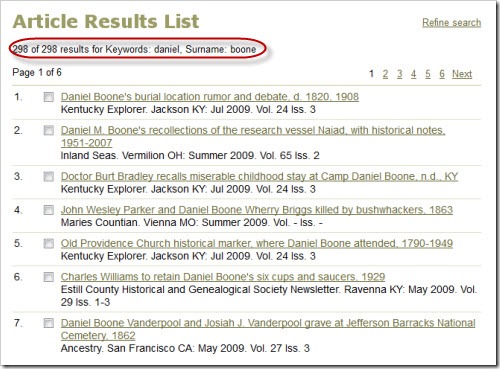
I could literally spend hours walking through a variety of search scenarios, but suffice it to say, you just need to experiment.  However, I will say, that this is not an every-name index, and therefore, searching for Daniel Boone might be a little tricky.  Articles will be classified by the Boone surname, which will return many results.  Unfortunately, trying to narrow down those results by entering the keyword Daniel will only display results where Daniel appears in the title (or another field), thus limiting your results considerably and you may miss some important references.

Boone

DanielBoone

BooneArticle

As you can see from the screenshots, there are 729 results for the Boone surname and 298 for the Boone surname with the keyword Daniel.  You’ll notice that the very first article listed in the Boone-only search, is not listed in the one where Daniel is included as a keyword because Daniel doesn’t appear in the title (or any other field).  That article may be very relevant to research on Daniel Boone, given the dates and places covered by the article.  Just keep this in mind while you are doing your searches.

So what do you do when you find an article of interest?  Well, you could try to locate a copy of the periodical that the article appears in, but when you don’t have ready-access to certain periodicals, that could be difficult.  A better option is request a copy of the article from the Allen County Public Library.  For a relatively inexpensive fee, you can order up to six articles at a time.  Although they ask for six to eight weeks to process the requests, it is usually much quicker.  You can access a PDF of the form here.  Be sure to have it handy when searching PERSI so you know what information to collect from the database.


Share/Bookmark

Wednesday, April 24, 2013

Family History Through the Alphabet – Organization

Family-History-Through-the-Alphabet

For 26 weeks I will take you on a family history journey through the alphabet, one letter at a time.  I have decided that each post will be educational in nature, focusing on topics related to resources, methodology, tools, etc.  Although the challenge is complete, there are still some people who are finishing up and Alona, the host, is encouraging others to participate anyway.  Additional information on the challenge, can be found at Take the ‘Family History Through the Alphabet’ Challenge


oAlthough I could spend weeks writing about organization, I decided on a specific area of organization, that being digital images.  In this post I’ll share with you how I structure my files, how I name them, and how to add metadata for future reference.

Over the last few years, the organizational structure for my digital images has evolved and I am quite content with where it is now.  I won’t bore you with the details of the evolution, or how I’m still in the process of getting all my files named correctly, but I will share with you what I do.

Hierarchy

First, I have a main folder named Family Tree.  This folder holds everything related to my personal genealogy research, including my Legacy Family Tree file, digital images of records, photos, resources (such as digitized county histories and maps), correspondence, reports, forms and templates, articles and stories I’ve written or am working on, etc.  For the purpose of this post, I will focus on my Images & Documents folder, which contains three subfolders, one for records related to my husband’s family, one for my family, and a research folder.  Note:  I named my Images & Document folder with “00 –” at the beginning of the folder name so that it appears at the top of my list.

Hierarchy

The two family folders are organized by surname and will be the focus of this post.  But before I move onto that, I want to share what the Research folder is and how I use it.  The Research folder is further broken down into four subfolders: 

  • Active Research – This folder contains an array of materials that pertain to some of my bigger research problems.  It’s arranged by research problem and the files could be digital images, notes, proof summaries, etc.  If I feel that something has been proven, I will move the files to the applicable family/surname folder.
  • Reports – This folder contains mostly spreadsheets that keep track of records I need to search or pull.
  • Resources & Reference Materials – This folder contains various resources such as digitized county histories, maps, atlases, locality guides, and other information on a particular area.  The subfolders are arranged by state, then county, then city/town (if necessary).  For example, below is my Illinois folder.  Anything that pertains to the state as a whole is in that main folder.  Anything that pertains to one of the three counties goes in the applicable folder.  The Cook County folder also has a subfolder for Chicago.

ILfolder

  • To Process – This folder contains a variety of digital records that I have obtain but have not yet been able to process.  Once they are processed, they will get renamed and moved to the appropriate family/surname folder.

As I mentioned earlier, the family folder (there’s one for me and one for my husband) is broken down by surname.  You’ll notice in the image below that I again use numbers in front of folder titles, again to bring them to the top.  When I don’t know the maiden name of a female, it goes in the Unknown Maiden Name folder.  The Unknowns folder holds a few unidentified photos and some documents from my family papers that I don’t know who they belong to.

Juliefolder

Within these surname folders, there is a Photos folder and all the digital records associated with that surname.  My naming convention is how I keep them organized without have to add yet another layer of folders.

CahilFolder

So now that you’ve seen how my files and folders are structured, let’s turn to the naming convention I use.

Naming Convention

This is the part that has evolved over time and I have found something that works for me and am in the process of updating all of my files to follow the same convention.  At any rate, here is how I name my files:

          LAST, First Middle RIN – Year Record

The RIN is the number assigned to each individual in my database (and will carry over to other programs if I ever switch).  This helps me deal with people of the same name, as well as knowing exactly which person a record matches up to in my database.

So for example, the file name for the 1847 Luxembourg census record for my fourth great-grandfather, Heinrich Schwartz, would look like this:

          SCHWARTZ, Heinrich 10132 – 1847 Luxembourg Census

Another example, using a middle name, would be my grandfather’s death certificate, which would look like this:

          CAHILL, John Francis 96 – 1984 County Death Certificate

I would also like to note that I file everything by the main person of the record.  So for example, a female’s death certificate would be filed under her maiden name, not her married name.  Additionally, I only save one copy of a census record filed under the head (when it’s the female, again, it goes under her maiden name).  I’ve found that this is easier for me than dealing with family groups, especially when multiple marriages are involved.

Metadata

The last thing I want to share with you is how I use metadata to further define my digital images.  Metadata is sometimes tricky and different depending on the file type.  All of my images are saved as high-resolution JPG files, so the process I will demonstrate will work for those files types, as well as a few others including TIF files. 

In order for me to know the source of the image, I simply use the source citation and place it in the Comments box in the properties of the image file.  To do this on a PC, right-click on the file and choose Properties.

Menu

Then click on the Details tab.

Properties

Then type (or paste) the citation in the Comments field.

Comments

The other thing I do is add tags for all the people associated with a record.  This way, I can run a search on a tag and find all of the images that pertain to that person, even if the image isn’t filed under that particular person.  Remember I said I only save one copy of a census?  This is how I compensate (same goes for photographs with multiple people).  For the tags, I use the RIN number for each person so that it is consistent and I know who corresponds to who in my database.

You’ll notice in the image above, there is a Tag field right above the Comments field.  So you would follow the same process to get to the Details and add in your tags.

Wrap-Up

I hope this post gave you some insight into how I manage my digital images.  There are plenty of ways to organize your digital images; I’m simply sharing the way that works for me.  I can’t say that it will work for you, as we all operate and think differently.  But maybe it will or maybe it will spark an idea of your own that will work better for you. 


Share/Bookmark

Wednesday, April 17, 2013

Family History Through the Alphabet – NGS Bible Records

Family-History-Through-the-Alphabet

For 26 weeks I will take you on a family history journey through the alphabet, one letter at a time.  I have decided that each post will be educational in nature, focusing on topics related to resources, methodology, tools, etc.  Although the challenge is complete, there are still some people who are finishing up and Alona, the host, is encouraging others to participate anyway.  Additional information on the challenge, can be found at Take the ‘Family History Through the Alphabet’ Challenge


nI have had the NGS Bible Records collection on my list of things to explore for quite some time.  Now I have an excuse to check it out and of course write about it and share the resource with my readers.

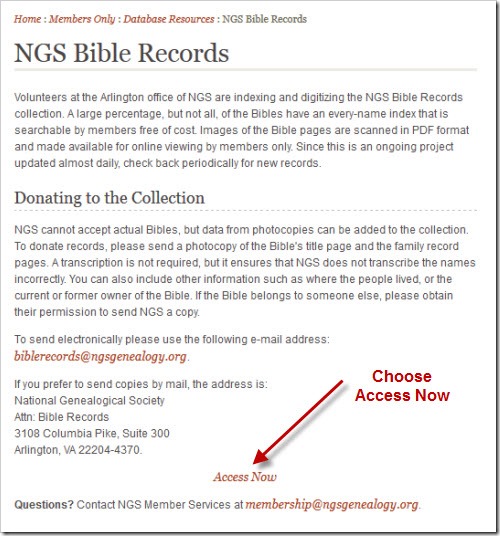
The National Genealogical Society has been collecting Bible records for many years (they do not collect the original Bibles, just copies of applicable pages).  They index all the names in the Bible and make them available in a searchable database to NGS members.  There are even PDF files that contain the images of the copied pages, and some also include the transcription if one was sent with the copies.

To access this collection, you have to be a member of NGS.  Visit the NGS website and click on the Members Only tab in the menu at the top. 

NGS-mem

Login, and then choose Database Resources from the left-side menu.

NGS-db

Then choose NGS Bible Records from the list.  You will see a short introduction to the collection, as well as how you can submit your own records.  Then, just after that, there is an Access Now button that will take you to the database.

NGS-db-access

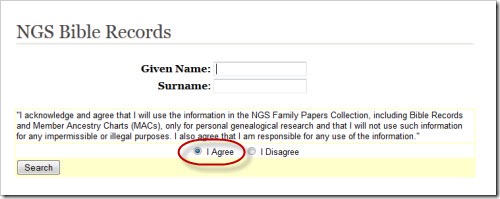
Now you can search the database using either a given name, surname, or both.  Be sure to check the “I Agree” button. 

NGS-search

Although I couldn’t find any instructions on using the search, I did refer to an article written by Shirley Langdon Wilcox in the Jan/Feb/Mar 2006 issue of the NGS Magazine entitled “Saving Our Bibles.”  In this article, she talks about the database and offers up a wildcard tip.  Using the % (percent sign) is similar to using the * (asterisk) on Ancestry.  It represents one or more characters, so for example, a search of M%ller will return Miller, Muller, and Mueller.  You could also use T% in the given name box to find all given names that start with the letter T, as well as those using initials only.

While I didn’t find anything for my own family, I did explore some of the search results.  I only have one family Bible in my possession, and it’s one of about four that I’ve seen, so it was neat to see other Bible records.

Your Turn

Have you used this resource?  If so, did you find anything interesting?  Please share…I love hearing success stories!!


Share/Bookmark

Wednesday, April 10, 2013

Family History Through the Alphabet – Message Boards & Mailing Lists

Family-History-Through-the-Alphabet

For 26 weeks I will take you on a family history journey through the alphabet, one letter at a time.  I have decided that each post will be educational in nature, focusing on topics related to resources, methodology, tools, etc.  Although the challenge is complete, there are still some people who are finishing up and Alona, the host, is encouraging others to participate anyway.  Additional information on the challenge, can be found at Take the ‘Family History Through the Alphabet’ Challenge


mMessage boards and mailing lists can be good tools for genealogy research.  There are plenty of boards and lists out there covering a variety of topics, surnames, and places.  I tend to favor Ancestry Message Boards and RootsWeb Mailing Lists because they are popular and because I can subscribe to them using my RSS reader and not have to worry about filling up my inbox.  (Note:  RootsWeb Message Boards are the same as Ancestry Message Boards, but for whatever reason, you cannot subscribe to them via RSS.)

Wait a minute…did she just say that I don’t have to subscribe via email?  Yes, you read right. 

ReaderListI personally don’t like to receive a ton of email each day, so any way I can reduce that clutter makes me happy.  About a year ago, I discovered that I could actually use RSS to subscribe to Ancestry Message Boards and RootsWeb Mailing Lists and read them in my favorite RSS reader at my convenience.  I have a folder in my reader dedicated to message boards and mailing lists so they are all grouped together and I get to them when I can. 

For me, it’s much more convenient than clogging up my inbox (even though when I used this method, I had those emails filtered and routed to a specific folder…but for each new list, I had to set up the filter and that takes time and energy—and I have to remember to do it!).  On the right is a partial list of my message board and mailing list subscriptions, currently using Google Reader.

So how do you subscribe to these via RSS?  Let’s look at Ancestry Message Boards first.  From the main Message Boards page, you can search for or browse through message boards.  There are message boards for surnames, places, and general topics.  Once you have found a message board that you want to subscribe to, click on the “Subscribe to RSS” link and follow the prompts to add it to your preferred reader. 

AncestrySubscribeRSS

I like to change the name of my subscription to something that makes sense to me, so in this example, I would change it to Luxembourg – Ancestry Message Board. Then I assign it to my Message Boards and Mailing Lists folder and now I’m good to go!

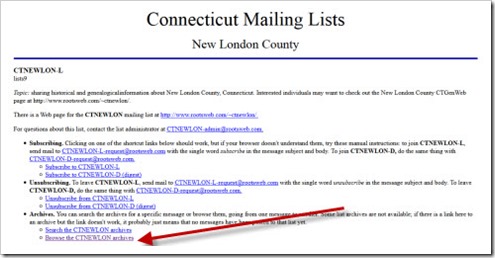
Similarly, from RootsWeb Mailing List main page, you search or browse to find a mailing list of interest.  When you get to the list you want, you should see a page that looks like the one below.  This page contains the instructions for subscribing / unsubscribing to the mailing list—via EMAIL.  From this page you can also search or browse the archived messages.  You will want to choose the link that says “Browse the [mailing list ID] archives” at the bottom of the page.

RootsWebMailingListMain

You will then come to a page that lists the archived messages grouped by month/year.  Scroll down to the end of the page and find the RSS button.  Click the button and follow the prompts to subscribe using your favorite reader.  Again, I change the name of the subscription and place it in the correct folder in my reader.

RootsWebMailingList RSS

Of course there is more to message boards and mailing lists than following along.  In a few weeks, when the alphabet challenge gets to the letter Q, I will discuss queries.

And of course, there are more message boards and mailing lists out there besides the two I’ve discussed.  GenForum by Genealogy.com is one, and don’t forget to check out Yahoo! Groups and Google Groups as there are plenty of genealogy-related groups through both. And be sure to check out Cyndi’s List topics Queries & Message Boards and Mailing Lists for even more.


Share/Bookmark

Wednesday, April 3, 2013

Family History Through the Alphabet – Like

Family-History-Through-the-Alphabet

For 26 weeks I will take you on a family history journey through the alphabet, one letter at a time.  I have decided that each post will be educational in nature, focusing on topics related to resources, methodology, tools, etc.  Although the challenge is complete, there are still some people who are finishing up and Alona, the host, is encouraging others to participate anyway.  Additional information on the challenge, can be found at Take the ‘Family History Through the Alphabet’ Challenge


lIf you are on Facebook, you are probably familiar with the Like button.  You can “like” someone’s status update, a link they share, or photos they’ve uploaded.  Even better than that, you can “like” various Facebook pages created by companies, organizations, and people. 

In terms of genealogy, this could include pages related to your favorite software, pages for genealogical and historical societies, or pages created for various genealogy-related events.  There are even pages for a variety of genealogy topics, such as community pages created by FamilySearch related to a specific state/country where people can “gather” to help each other out.

"Liking” a Facebook page is basically like “friending” or “following” friends, family, colleagues, or associates on Facebook.  When you like a page, their status updates and such will appear in your feed, just like your friends’ statuses.

LikeButtonWhy might you want to “like” various genealogy-related pages on Facebook?  Here are a few reasons:
  • Keep up-to-date on your favorite societies, products, and events.
  • Meet new people who share your love of genealogy.
  • Get help or help others.
  • Show your support.

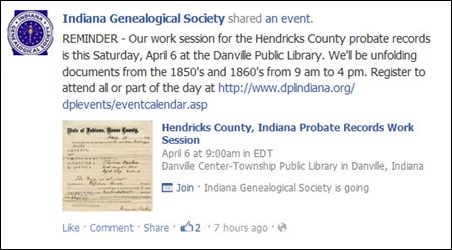
Here are some examples of updates I saw in my feed:

  • An event posted by the Indiana Genealogical Society.
    IGS
  • A new photo album related to lighthouses, posted by the Stonington Historical Society.
    Stonington
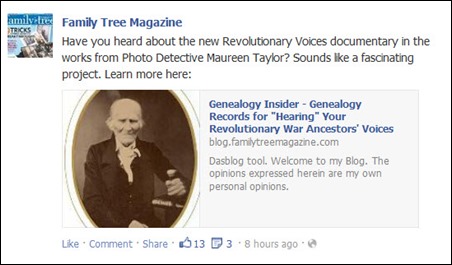
  • News about a documentary project that Maureen Taylor is working on, posted by Family Tree Magazine.
    FTM

There are plenty of companies and societies on Facebook that have an active presence and share relevant and timely information.  I started to collect bookmarks for any society I found with an active Facebook page in my Diigo bookmarks, which you can find here (it also includes societies using other forms of social media such as blogs).

Here are a few of my favorite genealogy-related Facebook pages:

Feel free to share links to your favorite genealogy-related Facebook pages in the comments of this post.


Share/Bookmark

  © Copyright 2008~2013. All rights reserved.

  © Blogger template 'Minimalist E' by Ourblogtemplates.com 2008

  Social media icons are from GraphicsFuel.com

Back to TOP  

Related Posts Plugin for WordPress, Blogger...