Picture

Picture

Tuesday, April 26, 2011

Search Strategies: Ancestry – Part 3

This is part of a series entitled Search Strategies.  Each article will feature a different database and various ways to conduct effective searches.  Some databases may have multi-part articles.

Search Strategies:  Ancestry – Part 2 discussed the use of Soundex and wildcard searches.  In Part 3, we’ll look at targeting search results.

When you perform a search (as instructed in Parts 1 and 2) you get a listing of matches within a particular record or index set.

searchresults

When you click on any of those links, you are taken to a detailed results list for that particular set.  You may have noticed that at the end of the search results, there is an additional section that allows you to perform a more targeted search.  (Note:  You may have click the link that reads “Show Advanced Search Options” to display all of the additional fields available.)

  expandedsearch

The advanced search option is available for most record/index sets, but the available fields will vary depending on the particular set you are viewing.  I will illustrate a few examples to give you some ideas on implementing these types of searches.

Let’s say you want to find John Smith in the 1920 census.  A general search for John Smith living in the US yields over 31,000 results.  So how can we narrow this down?  Go into the detailed results for the 1920 census and scroll down to the advanced search options.  We know that the John Smith we are looking for was born in New York about 1880 and is suspected as living in Illinois at the time of the 1920 census.  Here’s what I would enter into some of the other fields to narrow down the results:

First Name John
Last Name Smith
State Illinois
Birthplace New York
Estimated Birth Year 1880 +/- 2

This narrows the search results to three that match this specific criteria.

But let’s say we didn’t have any idea where John was living in 1920.  I’d instead use the following criteria, essentially removing the State:

First Name John
Last Name Smith
Birthplace New York
Estimated Birth Year 1880 +/- 2

This results in 206 matches, which is certainly more manageable than 31,000+.  You can narrow this down by perhaps adding his wife’s name in the Spouse’s Given Name field, if known and is suspected to also be in the census.

There are all sorts of combinations you can experiment with using the advanced search options.  To find possible married daughters (in the first census where they do not appear with their parents and are of age to marry), I perform a search populating the following fields:

  • First Name
  • State
  • County
  • Birthplace
  • Estimate Birth Year
  • Father’s Birthplace
  • Mother’s Birthplace

It doesn’t always work (and it’s not really helpful for my big-city folk), but in other cases it has lead me to the right person by giving me possible leads to follow using other records (especially useful when marriage records are lost/destroyed or inaccessible).

Sometimes when I suspect that a surname is indexed incorrectly (and the wildcard search isn’t picking it up), I’ll do a search using the first name, birthplace, birth year (with a +/-), state, county, and possibly township.  If the name is common (like John), I’ll also add the spouse’s name.  In cases where there are still a lot of results to comb through, I sometimes adjust the first name to that of a child and then populate the father’s and/or mother’s name.  This is how I found my Cahill family in 1930, who were indexed as Isbill (wouldn’t have found it any other way!!).

A word of caution:  The search criteria entered is only as good as the information recorded.  Using the John Smith born in New York example, if the birthplace is indexed as New Jersey (either in error on the census or in error in the index due to illegibility) the narrowed down search using a birthplace of New York would of course not pick this up.

Also note that some fields may or may not be available depending on the census year or how Ancestry indexed the information.  For example, while the father’s, mother’s or spouse’s name can be used in the 1880-1930 censuses, those fields are not an option for pre-1880 censuses.

Another example is using the Birthplace field in the 1930 census…if the person wasn’t the head of household, for some reason the birthplace was not indexed, so if you enter a birthplace, you will not get a full representation of the data.

The sky’s the limit.  Play around with the advanced search options to see what you can do to target your searches.  And remember, this can be found in most record/index sets, not just the censuses.

To Be Continued…

We  will continue to look at more strategies for effective searching with Ancestry in Part 4.

See also:


Share/Bookmark

Sunday, April 24, 2011

Weekly Finds - My Diigo Bookmarks (weekly)

Posted from Diigo. The rest of my favorite links are here.


Share/Bookmark

Friday, April 22, 2011

Search Strategies: Ancestry – Part 2

This is part of a series entitled Search Strategies.  Each article will feature a different database and various ways to conduct effective searches.  Some databases may have multi-part articles.

Search Strategies:  Ancestry – Part 1 showed you how to set up the search screen that I personally use, which gives you more control and usually better results.  Part 2 will discuss various tips for conducting actual searches with this setup using Soundex or wildcard searches.

search3

Soundex

Before I get into a discussion about wildcards, I want to talk about Soundex and it’s limitations.  Many of you already know what Soundex is and how it works.  If you are not familiar with this or want to know more, Ancestry’s Help does a pretty good job explaining it and showing you how to convert a name into this code.

While Soundex is all good and well, there are some limitations and problems, in my opinion.  First, the first character in the code is based on the first letter of the name (e.g., Tarr = T-600).  But, sound is the focus here, so when it’s misread and misindexed as Farr, the T-600 Soundex code does me no good, because the code for Farr is F-600.

The other problem is that a code can have so many different variants that are nothing like what you are looking for. For example, a Soundex search for John Tarr in Illinois produced 248 results for the 1920 census, including the following:  Tayor, Trey, Try, Tarro, Toher, Troy, True, Toouriy, Tria, Towery, Terry, Tauer, Thayer, Their, Therry, Theiry, Thore, Thorne, Threw, Thuraw, Toor, Torew, Torri, Tower, Tredwell, Tree, Trehey, and Trow. 

Some of these don’t even come close to sounding like Tarr, but because of the value assigned to the letters, they all share the same code.  For this reason, I personally do not use this method unless I am at a complete dead end.

And finally, depending on the various spelling of a particular name, there could be more than one Soundex code that needs to be searched.  For example the name Schwartz can be spelled with or without the “t",” which yields two different codes (the “c” and the “h” have no bearing on the code in this case):

  • Schwartz/Swartz/Shwartz (and each variant with an “e” at the end) = S-632
  • Schwarz/Swarz/Shwarz (and each variant with an “e” at the end) = S-620

So how can we overcome these limitations and problems with Soundex?  Simply put—use wildcards!

Wildcards

There are just too many variables at play with Soundex, which is why I prefer the use of wildcards.  This for me is the fun part, and the chance to tap into my creative mind to find those pesky ancestors.  It’s a puzzle in itself, finding the right combination of letters and wildcards to have better control over your search results.  And you may not be aware, but Ancestry changed the way they handle wildcards, probably a year or so ago, giving us even more flexibility in conducting these types of searches (before, you couldn’t start with a wildcard in the first position and now you can).

All of the following examples are from my personal experience and I hope they illustrate ways in which you can implement this solution into your own research. 

But before we get started, here’s a quick definition of what wildcards are.  In many cases, these same characters work across websites that perform search functions, however, they can vary and may have different limiting criteria.  The following is what Ancestry allows:

  • A question mark (?) is used to replace one letter (e.g., use franc?s for Frances and Francis).
  • An asterisk (*) is used to represent a string of letters (e.g., use fran* for Frances, Francis, Frank, Fran, etc.).  The string could be null, in that fran* will retun Fran in addition to the others.
  • A wildcard can be used in any position and multiple wildcards can be used within the same name.  However, at least three other characters have to be used as well.
  • Wildcards can be used for both the first and last name, even in the same search.

If Ancestry doesn’t like your usage, it will notify you and provide suggestions for using wildcards.

The first example I want to highlight is the Schwartz example mentioned above.  Because this would require you to perform multiple searches (either an exact using all the variations, or a Soundex using two different codes), I use the following wildcard search that incorporates all the variables:

     s*war*z*

The first asterisk allows the search to find anything that starts with an “s” and may include other letters before the “w.”  The second asterisk will pick up anything that may have letters after the “r.”  The last asterisk will pick up anything that may have letters after the “z.”  Just because an asterisk is used, it doesn’t mean that the search will only pick up names with strings to fill the blank…it will also pick up the name “swarz” which is what is left after the asterisks are removed.

Let’s illustrate the difference between Soundex and Wildcard search returns.  Using the two different variants with Soundex and the one wildcard search, here’s what the 1900 census for this surname with a location of Illinois reveal:

  • Soundex – Schwartz (5,633) + Schwarz (8,759) = 14,392
  • Wildcard – s*war.z* = 4,757

Another name I’ve been working on is Haacke.  There are many variables for this as well (one “a,” no “e,” no “k” or any combination thereof), although the variables are covered by one Soundex code.  Here’s the wildcard string I’ve been using:

     h*ac*

This helps me pick up names that have either one or two of the letter “a” and those missing the “k” and/or the “e.”

Using the same criteria of a location of Illinois and the 1900 census, the following are the search results:

  • Soundex – Haacke = 34,616
  • Wildcard – h*ac* = 6,308

As you can see, there is a huge difference in the number of returns you get.  Although the wildcard searches are still numerous, it’s certainly more manageable than the Soundex results.  And also keep in mind that the search was done on surname only and a location of Illinois.  Adding a first name will surely bring those numbers down.  And, I also have some tips for narrowing down search results specifically for censuses (this will be covered in Part 3).

Following are some more examples:

Searching For Variations Wildcard String
Boone / Boon boon*
Leppin/ Leppen / Leppon / Lippin / Lippen / Lippon l?p*n
Miserentino/ Miserintino / Miserendino / Miserindino miser*ino
Norton / Naughton n”ton
Rodgers / Rogers ro*gers
Bachmann/ Bachman / Backmann / Backman bac?man
John / Johan/ Johann, Johnny, Johnnie joh*n*
Francis / Frances / Frank / Franny / Fran / Francesca fran*
Francis / Frances (only) franc?s
Caroline / Carolyn / Carolina carol*n*
Kathrine / Katherine / Catherine / Cathrine (or those ending in an “a”) ?ath*rin*
Kathleen / Cathleen ?athleen
All the Katherine and Kathleen variants combined ?ath*
Hulda / Huldah / Hilda / Holda h?lda*
Jesse / Jessie / Jess jess*
Elizabeth / Eliza eliza*
Ann / Anne / Anna ann*
Marion / Marian mari?n
Solomon / Solmon / Salomon / Salmon s?l*mon
Phebe / Phoebe ph*be

Tip:  If you have an O prefix, add an asterisk after the “o” and it will pick up those indexed with and without an apostrophe.  Unfortunately, in order to search for prefixes (O, Mc, Mac) that may or may not include a space, you’ll have to run a search with and without a space in order to pick each type up in the index (an asterisk will not pick the space up—maybe someday it will—hint, hint).

Another Tip:  Use wildcards to not only represent variants of spelling, but also in terms of what’s legible and what’s not.  Characters can be misread and therefore misindexed, such as “a” and “o” or “T” and “F” or “p” and “f”.

While I can’t cover every possible wildcard search in this post, this should give you a better idea of how and when to use wildcards to maximize your search.

To Be Continued…

That’s it for now.  In Part 3 we’ll look at targeting your search results.

See also:


Share/Bookmark

Search Strategies: Ancestry – Part 1

This is part of a series entitled Search Strategies.  Each article will feature a different database and various ways to conduct effective searches.  Some databases may have multi-part articles.

Ancestry is probably one of your top go-to databases when conducting general research.  For me personally, I like to start by building a family using census records and then move onto vital records.  Once I have a pretty good feel for the family structure (including places and time periods), I start to explore a myriad of other sources depending on the place, time period, and the family’s circumstances (i.e., did they own land or rent?). 

In order to construct the family structure, I rely on Ancestry’s collection of census images and any indexes or records related to vital statistics.  I’ve learned many techniques though trial and error on how to search effectively, and I am pretty successful in finding what I’m looking for.  I don’t pretend to be an expert, nor the authority on Ancestry searching, but I thought I would share with you a few of my secrets for successful searches in hopes of helping you find what you are looking for and maybe even remove a brick wall or two.

First Things First

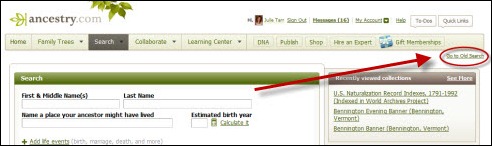
The first thing to note is that I prefer to use the “old search” since I like the way it searches and displays the results.  To toggle from new to old (or vice versa), from the Search page, click on the link in the upper right (just under the Ancestry menu bar).

toggle

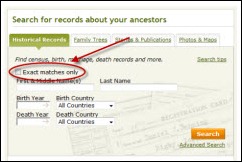
In the “old search” screen, I also mark the checkbox for Exact Matches Only.  By doing this, you do not limit yourself from wildcard or Soundex searches, but it does eliminate some of the outlandish results.  Once you check the box, the search screen will change slightly.  Note:  This is for Historical Records (the others, Family Trees, Stories & Publications, and Photos & Maps are not part of the following discussion, but may be covered in future articles).

search1 search2

Search Screen With Exact Match Off

Search Screen With Exact Match On

Performing a Search

Most of you know how to conduct a basic search, but I want to point out a few things by dissecting the fields in this search screen:

search3

First & Middle Name(s) – Use only one name in this field.  Even if the person had a middle name, the likelihood of a record or index item containing both a first and middle name is slim.  If the person went by both names, either together or interchangeably, try one first and if you don’t find anything, try the other.  More tips on this field coming up.

Last Name – No comments here, as this is pretty straightforward.  But lots of strategies are coming up shortly.

Spelling – This drop-down allows you to toggle between and Exact or Soundex search based on whatever you’ve entered in the Last Name field.  Note:  You cannot use wildcards with the Soundex search turned on.

Lived In – The first drop-down let’s you select a country, and once selected, another drop-down may appear to the right, allowing you to choose another location, such as a state.  This is helpful in most searches, but be cautious.  Not all records have a place associated with them except for where the record came from or the location could be wrong.  For example, in the latter case, a search for George Boone with a location of US and Tennessee did not provide the necessary census records.  According to earlier census (by which the information was probably provided by one of his parents), his birth location was Tennessee.  Since he was living in Iowa and listed his birth place as North Carolina, this particular search criteria didn’t pick him up.  It was only until I simply selected the US and let it default to any state that I was able to locate him in Iowa.

Year Range – I personally leave this blank unless I am looking for an event in a very narrow time period.

To Be Continued…

This post is already getting lengthy, so I’m going to stop here and start working on Part 2, which will get into the nitty gritty of search strategies.

See also:


Share/Bookmark

Sunday, April 17, 2011

Weekly Finds - My Diigo Bookmarks (weekly)

Posted from Diigo. The rest of my favorite links are here.


Share/Bookmark

Wednesday, April 6, 2011

Are You Up for the Challenge?

As many of you know, the Federation of Genealogical Societies is working to raise money in order to digitize the War of 1812 pensions.  The goal is to raise $3.7 million and to have the digitization of records completed in 2015.

You can help by contributing to the fund.  A $25 donation will digitize 50 images…a $500 donation will digitize 1,000 images.  No amount is too small, even $5 will digitize 10 images.

While you can make a donation directly to FGS (as I did months ago in honor of Marsha Hoffman Rising and two of my 1812 ancestors), you might consider participating in the challenge put out by the Indiana Genealogical Society.  Why? Because IGS is offering matches up to the first $10,000, meaning if you donate $10, IGS will match it with another $10.  In other words, if individuals contribute a total of $10,000, IGS will also contribute $10,000, for a total contribution of $20,000.  That’s a pretty great deal!  In September, IGS will present a check to FGS at the FGS 2011 Conference for all the money raised in conjunction with this challenge.

So far IGS has raised over $4,500 and hopes to reach their goal of $10,000.  To make a contribution to the IGS challenge, visit the War of 1812 Pensions Digitization page on their website.  There, you can also keep tabs on how close they are to their goal and see a list of contributors.


Share/Bookmark

Monday, April 4, 2011

Surname Database Available Through Illinois State Genealogical Society Website

One of the newest features of the Illinois State Genealogical Society’s website is a Surname Database.  Anyone can search the database and make contact with the person who submitted the listing, however, only ISGS members may submit a name to the database.

How It Works

ISGS members submit surnames, along with location information and dates.  The information is then added to the database, which is available to the public.  Anyone who searches the database and finds a surname of interest can then contact the ISGS member through the website (Note:  The ISGS member’s email address is not visible to the public to protect their privacy.) 

ISGS members who wish to submit their surnames can complete the online form.  Surnames will appear within a day or two after submitting the online form.


Share/Bookmark

Sunday, April 3, 2011

Weekly Finds - My Diigo Bookmarks (weekly)

Posted from Diigo. The rest of my favorite links are here.


Share/Bookmark

  © Copyright 2008~2013. All rights reserved.

  © Blogger template 'Minimalist E' by Ourblogtemplates.com 2008

  Social media icons are from GraphicsFuel.com

Back to TOP  

Related Posts Plugin for WordPress, Blogger...